
vWHM Admin Overview
A map of the vWHM administrator panel: what every screen does, from the dashboard and account tools to packages, services, monitoring, security, backups and the API.
On this page 9 sections
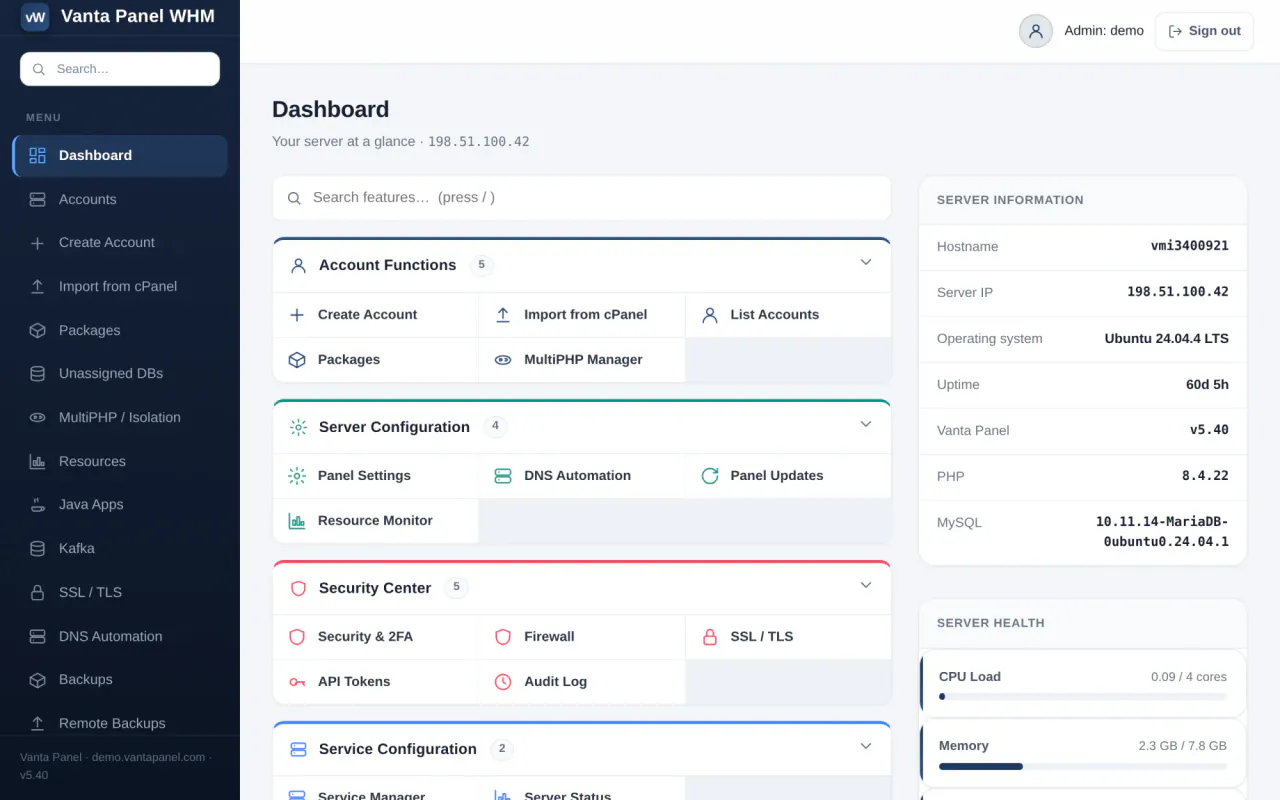
vWHM is the server administrator's control panel, reached at https://<your-server>/vwhm. It is where you provision hosting accounts, run the server, and manage everything that a hosting customer cannot touch themselves. Customers get a separate panel, vPanel, at https://<their-domain>/vpanel.
This page is the map of vWHM: what every screen does and which doc covers it in full.
The dashboard
The Dashboard is the landing page. It has three parts:
- Feature groups — the tiles in the middle, grouped as Account Functions, Server Configuration, Security Center, Service Configuration, App Platforms, and Backup & License. The search box above them filters tiles as you type.
- Server information rail — hostname, server IP, operating system, uptime, Vanta Panel version, PHP version and MySQL version; live CPU, memory and disk bars; account counts (total, active, suspended); and a Quick Actions block that links to Create Account and opens the restart-services and reboot dialogs.
- Needs attention — a list built on every page load. It flags every suspended account, and every account that has reached its package limit for databases, mailboxes or subdomains. Each row links straight to that account.
When a newer panel version has been published, a banner appears above the tiles. Dismissing it hides it until the next release.
The sidebar search also matches account usernames and domains, so you can jump to any account from anywhere in vWHM.
Accounts
- Accounts — the full account table with a username/domain search. Chips at the top show total, active and suspended counts.
- Create Account — provisions a Linux user, home directory, Apache vhost and panel login. See Creating a hosting account.
- Manage account — click any account to open its management screen: package, password reset, PHP version, suspend/terminate, notes, SSH, DNS, HTTPS, Java, Kafka and Redis. See Managing a hosting account.
- Import from cPanel — restore a cPanel account archive onto this server. See Migrating from cPanel.
- Packages — reusable limit sets you assign to accounts. See Packages and plans.
- Unassigned DBs — databases that exist in MySQL but belong to no account, usually left behind by a migration. See Unassigned databases.
Server configuration
- Settings — panel branding, support email, two-factor policy, and the server alert engine. See Panel settings and server alerts.
- Server Setup — the server's hostname, your private nameservers, and the optional built-in authoritative DNS. See Server setup and private nameservers.
- MultiPHP / Isolation — install PHP versions, set the default for new accounts, and move accounts into their own PHP-FPM pool. See PHP versions and account isolation.
- DNS Automation — optional Cloudflare integration that creates a domain's records automatically at account creation. See DNS automation.
- SSL / TLS — issue and inspect certificates for hosted domains, and sync the shared mail certificate. See SSL and TLS certificates.
Monitoring
- Server Status — live CPU, memory, disk and swap gauges, uptime, process count and core service health, refreshed every three seconds. See Server status.
- Resources — per-account disk, database and subdomain usage measured live, plus database registry maintenance. See Resource overview.
- Mail Queue — the Postfix queue, with the ability to flush or purge it. See The mail queue.
Services and maintenance
- Services — status, restart and reload for Apache, MariaDB and both panel services, plus restart-all and reboot. See Managing services.
- Updates — apply a new panel version in place. See Updating Vanta Panel.
- License — activate, view or remove the server's license. See Activating your license.
Security
- Security — your own admin password, admin two-factor, and an IP allow-list for the whole admin panel. See Admin access control.
- Firewall — the ufw rule list and fail2ban ban counts. See Firewall and brute-force protection.
- Audit Log — a filterable, paginated record of every privileged action. See The audit log.
- API Tokens and API — scoped bearer tokens and the endpoint reference for automating provisioning. See Using the API.
Backups
- Backups — take, list, download and restore per-account backups. See Backups.
- Remote Backups — push those archives to FTP, FTPS, SFTP, S3 or WebDAV on a schedule. See Remote backups.
App platforms
- Java Apps — installs the Java runtime, then lists every deployed
.jarapp across all accounts and lets you start, stop, restart, remove or tail the log of any of them. Java is switched on for an account on that account's own screen, not here. See Java hosting. - Node.js Applications — a read-only list of every Node app on the server, with its account, state, domain and port. Customers deploy and manage their own from vPanel. See Node.js applications.
- Kafka — install the broker and see per-account topics. See Apache Kafka.
- Redis has no page of its own. The server-wide install button sits on the Java Apps page, and it is then switched on per account from the account's management screen. See Redis.
A note on URLs and ports
vWHM listens on port 2087 and vPanel on 2083, but both are bound to 127.0.0.1 only and are never reachable from the internet. Apache proxies /vwhm and /vpanel on every hosted domain, so those are the addresses to use and the only ones that work from outside the server.
Something missing or out of date? Ask support, or try it yourself on the live demo.