 Vanta Panel
Custom Error Pages
Replace Apache's default 404, 403, 401 and 500 messages with pages of your own, chosen per domain. Covers how the pages are wired up with ErrorDocument, why an error page needs absolute paths, and how to check you are returning the right status code.
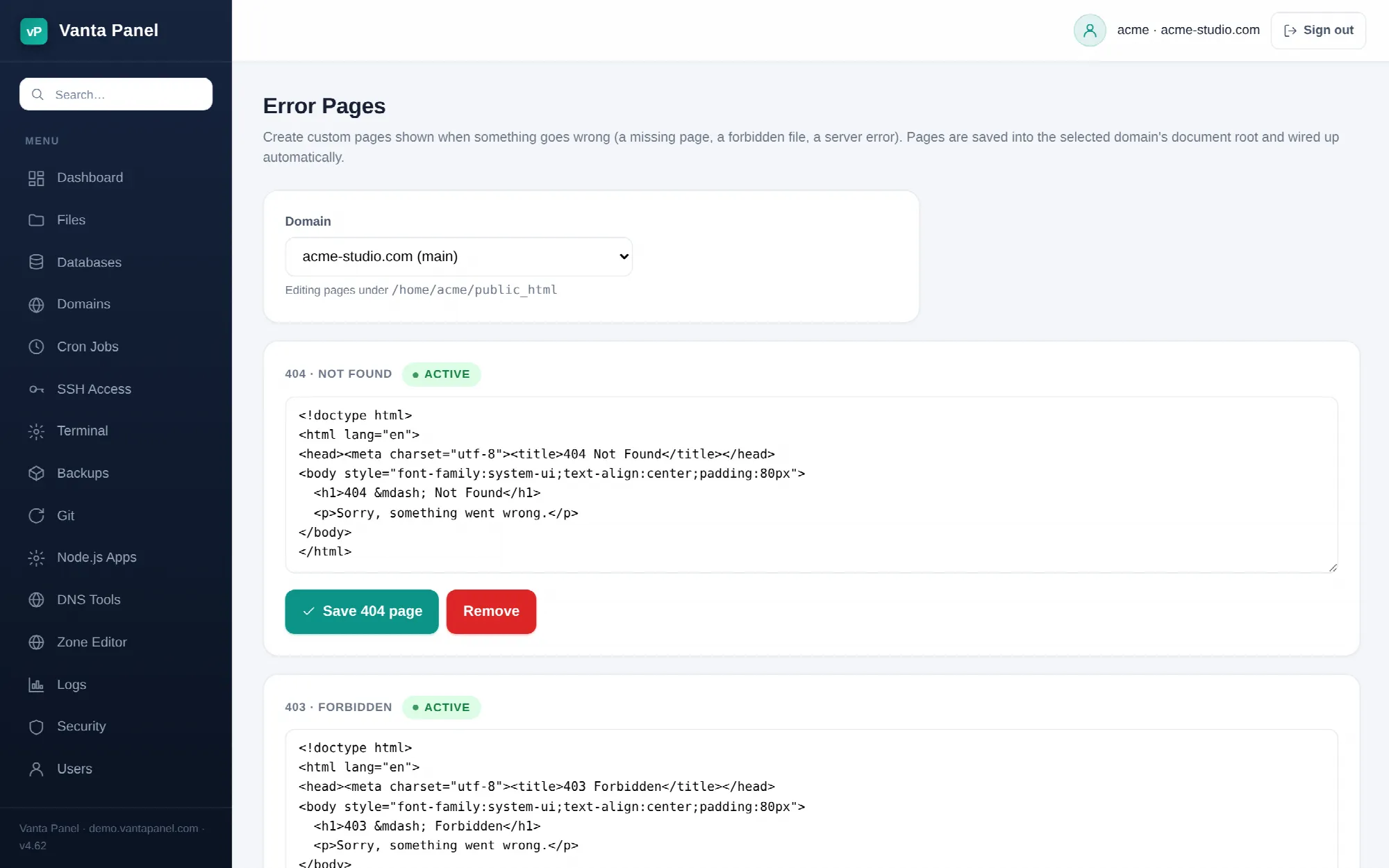 Editing custom error pages in vPanel.
Error Pages (vPanel → Dashboard → Software & Advanced → Error Pages) replaces Apache's stark default messages with pages of your own. Instead of a bare "Not Found", a visitor who hits a dead link sees your layout, your wording, and a way back to your site.
Which codes you can customise
Four, and they cover almost everything a visitor actually runs into:
| Code | When it is shown |
|---|---|
| 404 Not Found | The URL does not exist. By far the most common one, and the one worth writing properly. |
| 403 Forbidden | The server refuses to serve the request — a directory with listings turned off, or a file whose permissions block it. |
| 401 Authorization Required | Someone cancelled the login prompt on a password-protected directory. |
| 500 Internal Server Error | Your application crashed, or an .htaccess line is invalid. |
Editing a page
Pick a domain from the dropdown at the top — the primary domain, a subdomain, or an addon domain. Each has its own document root and therefore its own set of error pages. The page tells you which document root you are editing.
Each code gets a textarea. If you have not created that page yet, the box is pre-filled with a minimal, valid HTML document you can edit down; a code that already has a page shows an active badge and its current contents. Save writes it, Remove deletes it.
You are writing raw HTML, so keep it self-contained.
How it is wired up
Saving does two things. Your HTML is written to error_<code>.html in that domain's document root — error_404.html, error_500.html, and so on. Then the panel re-checks which of those files exist and rewrites a managed block in the same document root's .htaccess:
# BEGIN vantapanel-errordocs
ErrorDocument 403 /error_403.html
ErrorDocument 404 /error_404.html
# END vantapanel-errordocs
Only what is between those markers is touched; the rest of your .htaccess is left alone. Remove the last custom page and the block disappears.
Two consequences worth knowing:
- The directives are rebuilt from what is actually on disk, not from a stored list. If you upload an
error_404.htmlover FTP or with the File Manager, it will not be active until you save something on this page — that is what triggers the re-scan. - The path in the directive is site-root-relative (
/error_404.html). Delete the file by hand and Apache will fail to find the error page and fall back to its own default, which is harmless but not what you wanted.
Writing an error page that works
Use absolute paths for everything. This is the mistake that bites everyone. Your error page is served for any URL that failed, so a relative reference like <img src="logo.png"> resolves against the broken URL, not against your site root. Write /logo.png, /css/site.css, /.
Keep it light. If your 500 page pulls in a stylesheet, three fonts and an analytics script, it can fail for the same reason the original request did. A 500 page with inline CSS and no external requests is a 500 page that always renders.
Never put PHP in it. These are .html files and Apache serves them as static HTML. A 500 page that needs PHP is worthless precisely when you need it, because PHP is often what broke.
Do not redirect. Sending a 404 to your homepage looks tidy and is bad for you — it turns a clear "this page is gone" into a "this page exists and is your homepage", which is worse for search engines and confusing for visitors. Show the message and link to the homepage instead.
Give people a next step. A search box, a link home, or your contact page turns a dead end into a recovered visit.
Testing
Request a URL you know is missing — https://yourdomain.com/definitely-not-a-page — and confirm you see your page. Check the response code too, because a page that renders while returning 200 is invisible to search engines as an error:
curl -I https://yourdomain.com/definitely-not-a-pageYou want 404 Not Found in the first line. If you get a 500 instead, your .htaccess is unhappy — open vPanel → Logs, pick your -error.log, and the offending line will be named there.