
PHP Versions and Account Isolation
Install PHP versions, set the default for new accounts, and move accounts into their own PHP-FPM pool running as their own Linux user with open_basedir confinement.
On this page 8 sections
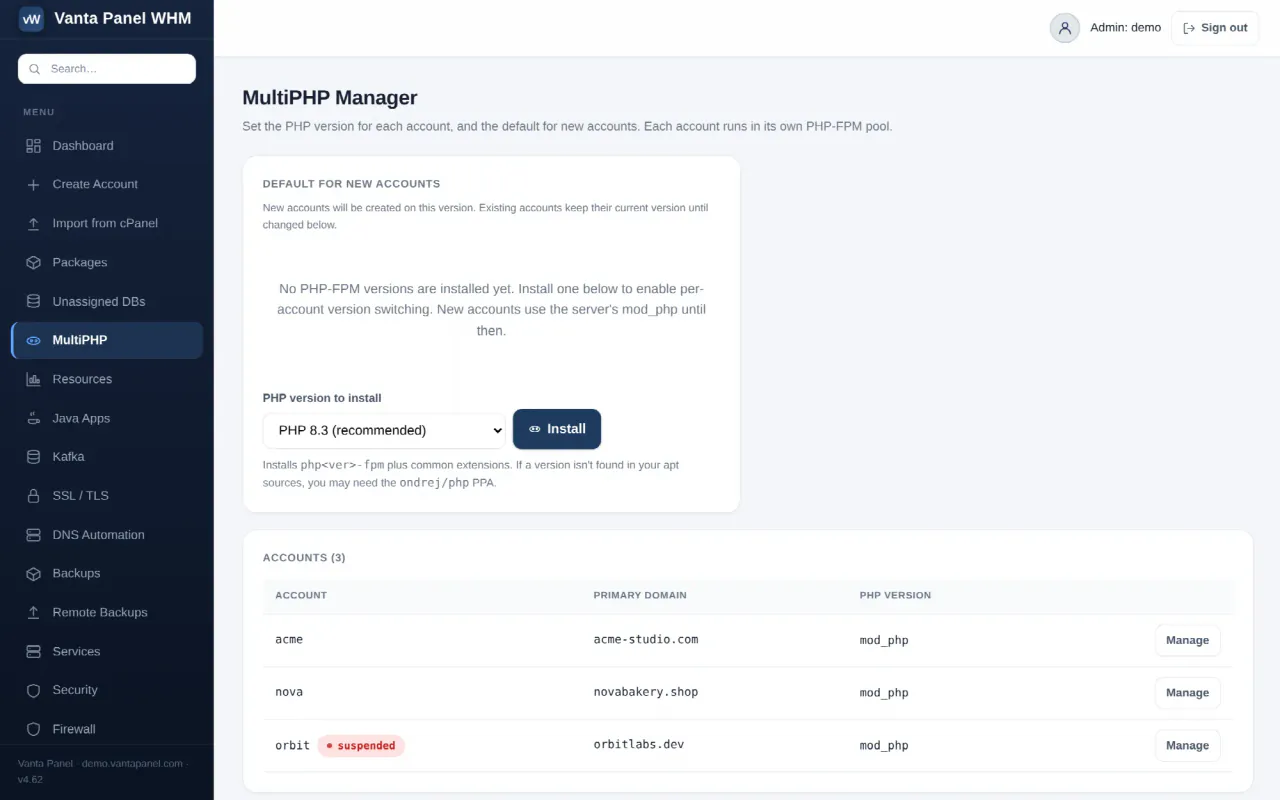
MultiPHP & Account Isolation (vWHM → MultiPHP / Isolation) does two related jobs: it chooses which PHP version each account runs, and — as a side effect of that same choice — it decides whether the account's PHP runs isolated in its own process or shared with everyone else's.
The two are the same setting because of how PHP is wired up. There is no way to isolate an account without also giving it a specific PHP-FPM version, and no way to give it a version without isolating it.
Shared versus isolated
Shared accounts run under the server's mod_php, as the single shared www-data user. All shared accounts' PHP runs as the same user.
Isolated accounts get their own PHP-FPM pool. In that pool:
- PHP runs as the account's own Linux user, not
www-data open_basediris set to the account's home directory plus/tmp, so its PHP cannot read another account's files- a list of shell-executing functions is disabled:
exec,passthru,shell_exec,system,proc_open,popen,proc_close,proc_nice,proc_terminate,proc_get_status,pcntl_execanddl - sessions, uploads and temp files are written to a private
tmpdirectory inside the account's home, so they stay insideopen_basedir - the pool runs on demand, with up to 5 worker processes, recycling after 500 requests
When an account is isolated, the panel also tightens its home directory to 0750 — but only if it can first grant Apache traverse access via an ACL, so serving static files never breaks. If the ACL cannot be set, permissions are left alone and the disabled-function list still confines PHP.
If you host anything for more than one customer, isolation is the setting that stops one compromised site reading the others.
Account isolation card
Shows two counts — how many accounts are isolated and how many are still shared — and, when any are shared, an Isolate all button with a version selector.
Isolating all moves every shared account into its own pool on the version you pick. The confirmation dialog is honest about the risk: sites keep running, but you should test them afterwards. It is reversible per account.
The page's own advice is worth following: pilot one low-traffic site, confirm it loads, then isolate the rest. The functions disabled in an isolated pool are the most likely thing to break an application that was relying on them.
If no PHP-FPM version is installed, isolation is unavailable and the card tells you to install one first.
Default for new accounts
Sets the version applied automatically to every account you create from then on — which also isolates it on creation. Choosing Server default (mod_php) leaves new accounts shared.
Existing accounts are not touched by changing this. They keep whatever they have until you change them.
Installing a PHP version
When no PHP-FPM version is present, the page offers an installer with PHP 8.3 (marked recommended), 8.4, 8.2 and 8.1.
Installing runs apt-get for php<version>-fpm plus the common extension set: cli, mysql, mbstring, curl, xml, zip, gd, intl and bcmath. If the full set fails, it retries with just the FPM package, since that is the part that actually matters.
If the version is not available in your apt sources, the install fails with a message saying so and suggesting the ondrej/php PPA. A version that is already installed reports as already present rather than reinstalling.
Installed versions are discovered by looking for /etc/php/<version>/fpm, so anything you install by hand on the server shows up here too.
The account table
Every account with its primary domain, a status pill if it is not active, and a version dropdown. The dropdown lists mod_php (default) plus every installed FPM version; Apply switches that account immediately. Manage opens the full account screen.
Switching a version writes the pool if it does not exist, restarts the FPM service for that version, and adds a SetHandler block to the account's vhost so .php requests go to the pool's socket. Test the account's site after a change.
Which vhosts get the FPM handler
Worth knowing before you rely on isolation, because it decides which of an account's hostnames actually run in the pool.
The handler block is written to exactly two filenames: <account>.conf and <account>-le-ssl.conf. That covers the primary domain over plain HTTP, and a legacy certbot SSL vhost if one exists. It does not cover:
qikssl-<account>-main.conf— the SSL vhost Vanta Panel writes today when you install a certificateqiksub-<account>-<label>.conf— subdomain vhostsqikaddon-<account>-<slug>.conf— addon domain vhosts
Requests to those hostnames keep using the server's default PHP handler even while the account is listed as isolated, and the same is true of Isolate all, which writes to the same two filenames. The isolated/shared counts and the per-account dropdown are also read from <account>.conf alone, so the page reflects the HTTP vhost.
In practice that means the pool's open_basedir and disabled functions apply to the primary domain over HTTP. If you are isolating accounts specifically to contain PHP on an HTTPS site, a subdomain or an addon domain, check the vhost for that hostname rather than trusting the badge.
What the customer sees
Isolated or not, the customer has a Select PHP Version page in vPanel with the same list of installed FPM versions — but no mod_php option. A customer switching version from their own panel therefore always ends up isolated, which is the safe direction. It uses the same code path as the table above, so the same vhost scope applies: the customer's HTTPS, subdomain and addon hostnames are not moved onto the chosen version.
That page also gives them a PHP Options panel for per-account php.ini values such as memory_limit and max_execution_time. Those apply on top of whichever version is active.
Audit trail
Recorded in the audit log as php.install when a version is installed, php.default when the default changes, php.isolate_all with the number of accounts moved, and account.php for each individual account switch — including the automatic one applied at account creation.
Something missing or out of date? Ask support, or try it yourself on the live demo.