 Vanta Panel
Redirects — Forward a Domain or Path
Forward a domain or a path to another URL with 301 or 302 redirects, including wildcard redirects that pass the rest of the URL through. Rules are written to a managed block at the top of the source domain's .htaccess, above your CMS's own rewrite rules.
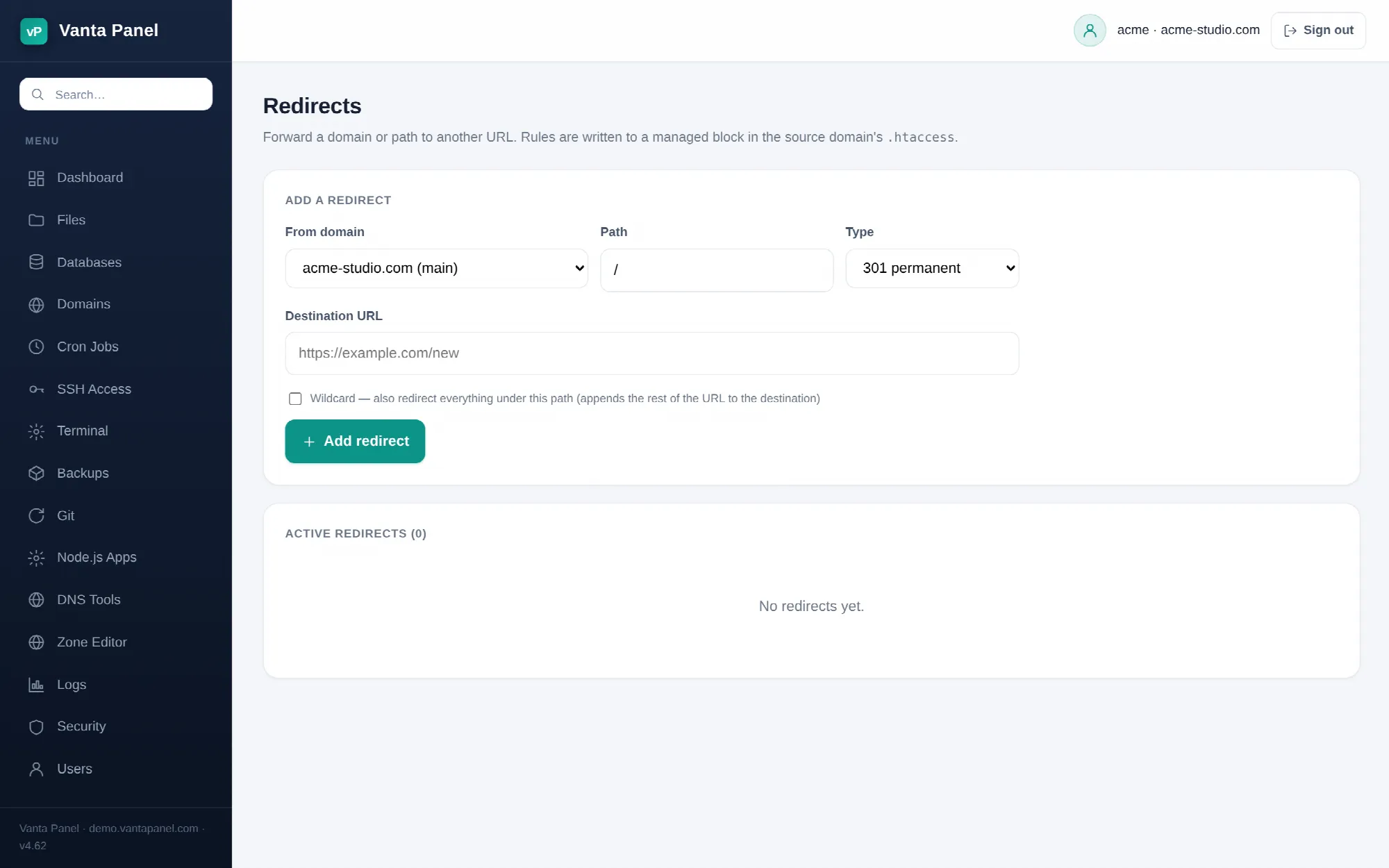 Creating URL redirects in vPanel.
Redirects (vPanel → Dashboard → Domains → Redirects) forwards a domain or a path to another URL. Use it when you move a page, retire an old URL, or want one of your domains to send visitors to another site. The rules are written into a managed block in the source domain's .htaccess, so Apache handles them — no PHP involved, and they work for static files too.
Creating a redirect
Four things to set:
- From domain — any domain on your account: the primary domain, a subdomain, or an addon domain. Each has its own document root, and the rule is written into that document root's
.htaccess. - Path —
/for the whole site, or something like/old-page. Paths may contain letters, numbers,.,_,~,-and/; anything else is refused. - Type — 301 permanent or 302 temporary. Use 301 when the move is final; search engines transfer the page's ranking to the new URL and browsers cache it. Use 302 while you are testing or for a temporary campaign page.
- Destination URL — must be absolute and start with
http://orhttps://. Relative destinations are rejected.
Wildcard redirects
Wildcard changes what happens to everything under the path you entered.
Without it, only the exact path is redirected:
/old-page          →  https://example.com/new
/old-page/details  →  not redirected
With it, the rest of the URL is appended to the destination:
/old-page          →  https://example.com/new
/old-page/details  →  https://example.com/new/details
A wildcard on / is the usual way to move an entire site: oldsite.com/anything lands on newsite.com/anything.
What is written to disk
Rules for one document root are gathered into a single managed block in its .htaccess:
# BEGIN vantapanel-redirects
<IfModule mod_rewrite.c>
RewriteEngine On
RewriteRule ^old-page/?$ https://example.com/new [R=301,L]
</IfModule>
# END vantapanel-redirects
Every time you add or remove a redirect the whole block is rebuilt from the panel's records, and only the text between those two markers is touched. Anything else in your .htaccess — WordPress rules, your own rewrites, hotlink protection — is preserved.
The block is written at the top of the file, above everything else. That is what you want: the redirect fires before a CMS's own rewrite rules get a chance to answer the URL, so a redirect on a WordPress site works without touching WordPress.
Because the block is regenerated rather than edited, hand-editing a rule inside the markers will not last — the next change you make in the panel overwrites it. Put custom rules outside the markers. If you delete your last redirect and nothing else remains in the file, the .htaccess is removed entirely.
Removing a redirect
Remove deletes the rule and rebuilds the block for that document root. If it was the last redirect on that domain, the block disappears entirely.
Do not forget that browsers cache 301 responses aggressively. After removing a 301 you may still be redirected on your own machine long after the rule is gone. Test in a private window, or with curl -I https://yourdomain.com/old-page, before concluding it did not work.
Things a redirect cannot do
- It cannot forward to a relative path on the same site — the destination has to be a full URL. If you want a same-site redirect, use your own domain in the destination.
- It will not fire for a hostname that does not reach this server. A domain has to exist on your account and point here first; see Websites and Domains.
- It needs
.htaccessto be read for that directory. Vanta Panel's vhosts are created withAllowOverride All, so this is the normal case, but a rule placed in a folder your application serves through a front controller may never be reached. - It cannot rewrite a URL silently. Every rule here sends a real 301 or 302 to the browser and the address bar changes. For invisible rewrites, write your own
RewriteRuleoutside the managed markers.