
Your First Hosting Account
Create your first hosting account in vWHM: every Create Account field, what Vanta Panel provisions, the login URLs and fixes for the common errors.
On this page 11 sections
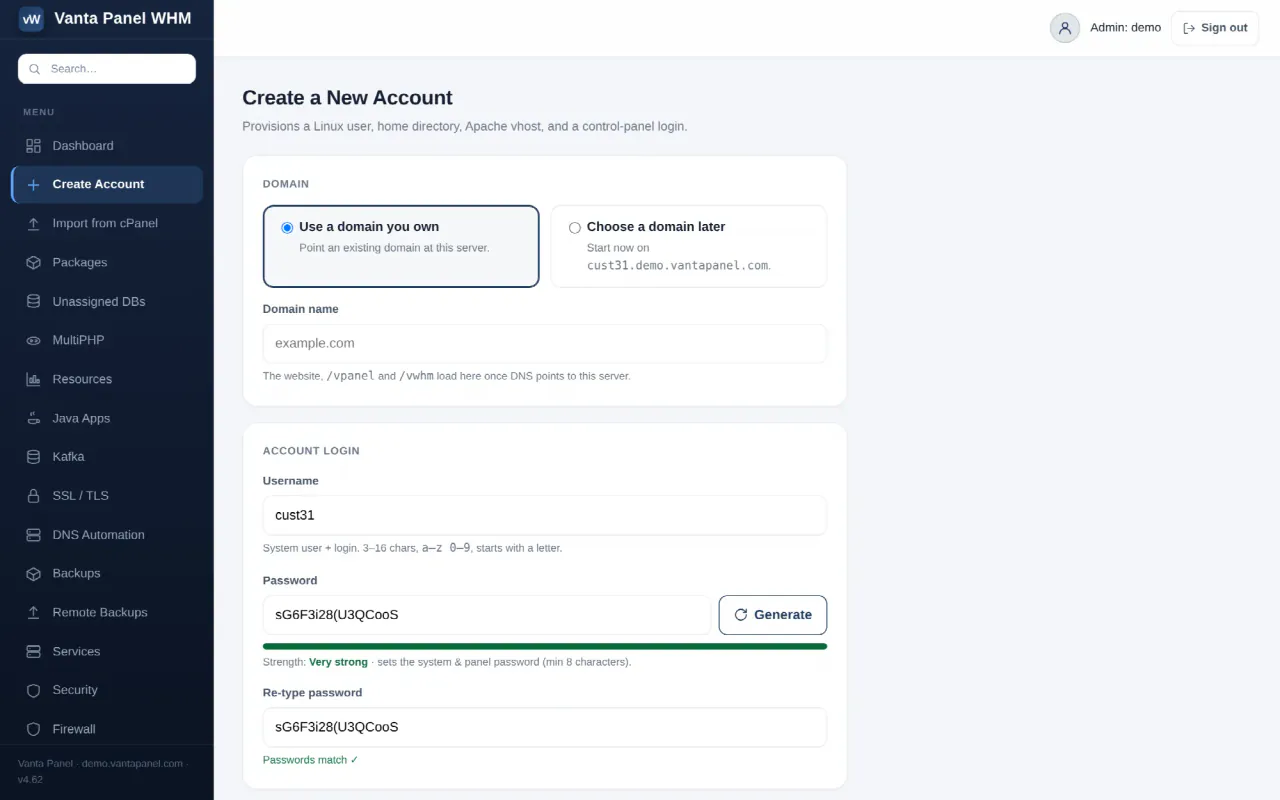
Every website on a Vanta Panel server lives inside a hosting account. You create accounts in vWHM (at /vwhm/ on your server's address); the customer manages theirs in vPanel (at /vpanel/). This page covers the Create Account form field by field, what gets provisioned, the receipt page, and the common errors.
Prerequisites
- Vanta Panel installed — see Installing Vanta Panel.
- A domain you control, or none yet (the form offers a temporary hostname).
- Optional: local DNS enabled under Server Setup (Private Nameservers) and a package under Packages (Packages and Plans).
- Licence headroom: Free allows 1 hosting account, Basic 5, Unlimited has no cap — see Activating your license.
Step 1 — Open the form
In vWHM click Create Account in the sidebar. The page is headed Create a New Account: "Provisions a Linux user, home directory, Apache vhost, and a control-panel login."
Step 2 — Domain
| Option | Behaviour |
|---|---|
| Use a domain you own | Type it under Domain name (for example example.com). Must be a valid fully-qualified domain. |
| Choose a domain later | Hides the field. The account starts on username.<panel hostname>; no DNS zone is created for the placeholder. |
As the hint says, the website, /vpanel and /vwhm all load on that domain once its DNS points at this server.
Step 3 — Account login
- Username — 3–16 characters,
a–z 0–9, starting with a letter; it is both the Linux user and the vPanel login. Reserved names such asrootandwww-dataare refused. - Password — 8 to 128 characters; sets the system and panel password together. Generate makes a random one.
- Re-type password — optional; if filled, it must match.
Step 4 — Owner & package
- Contact email (optional) — a valid address or blank; shown in the Accounts list and pre-filled as the admin email when the customer installs WordPress.
- Package — defaults to — none (unlimited) —; a package applies its disk, database, subdomain, addon-domain, mailbox and bandwidth limits.
Click Create Account. A one-time token means refreshing afterwards never creates a second account.
What Vanta Panel provisions
- A Linux user with home
/home/<username>and document root/home/<username>/public_html, seeded with a placeholderindex.html. - An Apache vhost for the domain and its
www.alias withAllowOverride All,/vpanel/and/vwhm/proxied to the panel,/phpmyadminand/webmailmapped, and per-account logs. If Apache's config test fails, everything is rolled back. - A self-signed certificate on a
:443vhost, so HTTPS answers immediately. - The default PHP version from MultiPHP / Isolation — see PHP Versions.
- With DNS Automation on: Cloudflare
Arecords for@andwww, optional mail records, plus SPF and DMARC — see DNS Automation. - With local DNS on (real domains only): a PowerDNS zone with SOA, NS,
A @,A www,MX 10 mail.<domain>, SPF and a monitoring-only DMARC record. - An
account.createentry in the Audit Log.
No mailbox or database is created automatically; the customer adds those in vPanel.
The "Account created" page
The receipt lists Domain, IP address, Username, Password (shown once — copy it), Home root, Package, Contact email, Name server 1 and 2, Customer panel (https://<domain>/vpanel) and Admin (WHM) (https://<domain>/vwhm). Until DNS propagates the customer can sign in at https://<panel hostname>/vpanel or on port 2083.
The DNS setup card offers Use your nameservers (only when local DNS is on — point the registrar at your ns1/ns2, with glue records) or Use Cloudflare (or any DNS host) with the two A records to add, plus Cloudflare import file and Plain DNS instructions downloads. Behind the Cloudflare proxy use SSL/TLS mode Full (never Flexible) until a trusted certificate is installed. Finish with Manage account, Create another or All accounts.
Logging in as the customer
Open the customer panel URL, enter the Username and Password and click Sign in. Team members from User Manager use account+yourname.
Next steps
- Replace the self-signed certificate via Manage account › SSL — SSL / TLS Certificates.
- Create the first mailbox — Email Hosting.
- Install WordPress from Application Installer — One-Click Apps.
Troubleshooting
| Message | Cause and fix |
|---|---|
Username must be 3-16 chars, a-z0-9, start with a letter. | No dashes, underscores or capitals. |
That username already exists in vantapanel. | Pick another name or manage the existing account. |
An account already exists for example.com — it was not created again. | The domain is already hosted here. |
Your plan allows 1 hosting accounts. Upgrade your plan… | Licence cap reached — activate or upgrade. |
Provisioning failed: system user already exists | A Linux user of that name exists outside the panel; choose another username. |
Provisioning failed: apache configtest failed (rolled back) | Apache's config is broken elsewhere; nothing was left behind. See Services. |
| Domain shows the wrong site | DNS is not pointing here yet, or Cloudflare is on Flexible. |
FAQ
Can I create an account before I have a domain?
Yes — pick Choose a domain later and add the real one afterwards under Websites and Domains.
Is the password emailed to the customer?
No. It is displayed once on the "Account created" page; the contact email is stored, not mailed.
How do I change the limits later?
Assign a different package from Manage account — Managing a Hosting Account.
Does every account count against the licence?
Yes: Free 1, Basic 5, Unlimited uncapped. Licensing is per server with no per-account fees — see Pricing.
Something missing or out of date? Ask support, or try it yourself on the live demo.