
Updating Vanta Panel
How Vanta Panel updates itself: signed manifests, Ed25519 signature and SHA-256 verification, an automatic backup before every update, and how to turn automatic updates off.
On this page 8 sections
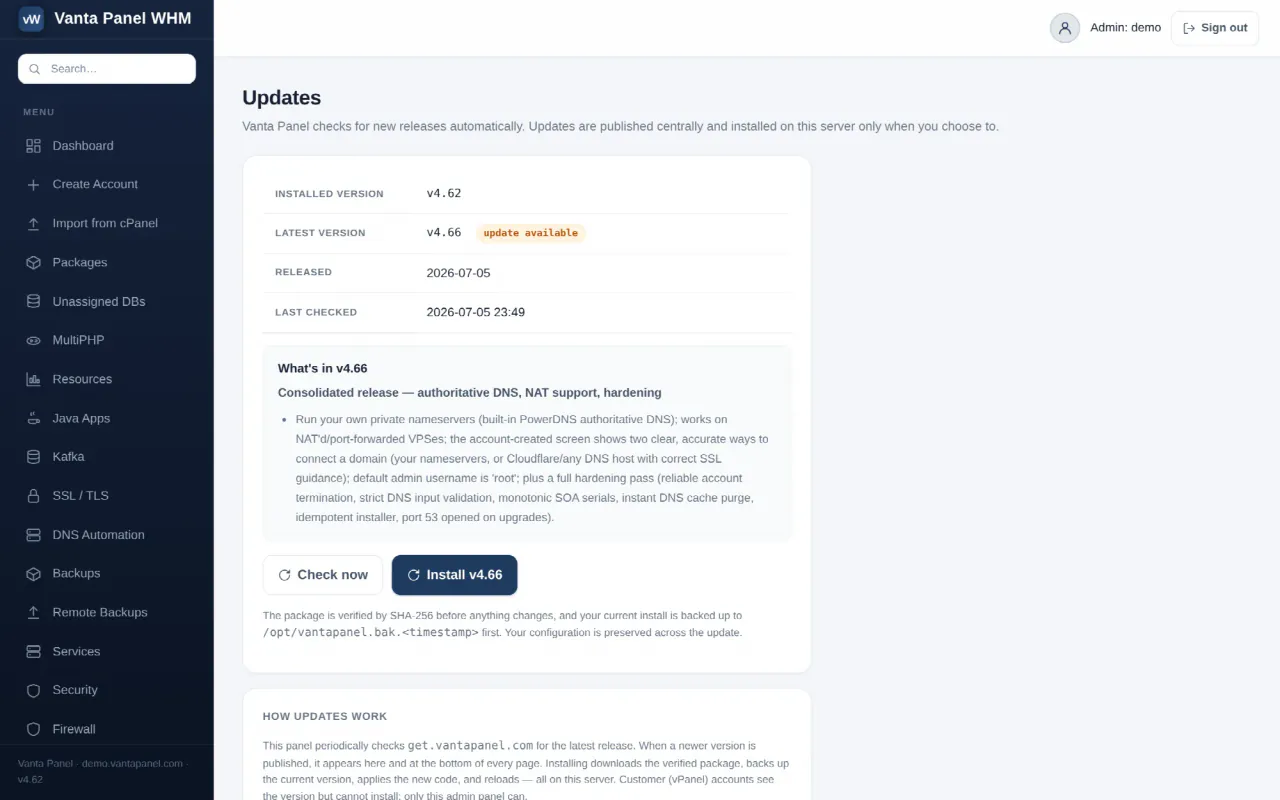
Updates (vWHM → Updates) upgrades Vanta Panel in place. There is no reinstall, no downloading a zip by hand, and no separate upgrade script. By default the server also installs new releases by itself, once a day.
The Updates page
The table at the top shows the installed version, the latest published version with an update available or up to date badge, the release date, and when the server last checked. When a new release exists, its release notes are listed underneath.
Two buttons:
- Check now forces an immediate check instead of waiting for the next scheduled one.
- Install v… appears only when a newer version is available, and applies it.
Only the admin panel can install updates. Customers see the running version in their panel footer but have no way to trigger an upgrade.
Where updates come from
Every install checks one central manifest at https://get.vantapanel.com/update.json. Background checks are throttled to once every 30 minutes; the dashboard forces a fresh check on load so a newly published release appears promptly.
That manifest is deliberately separate from the one the installer uses for fresh installs, so publishing an update can never change what a new installation downloads.
How an update is verified
The privileged part of the update takes no input from the browser at all — the button only says "go". The worker fetches the manifest itself and checks, in order:
- The manifest is well formed — it must carry a version, an
https://package URL and a 64-character SHA-256 hash. - The vendor's Ed25519 signature is valid. The manifest carries a detached signature over
version|url|sha256, verified against a public key compiled into the panel. The matching private key is held offline. This is what makes the checksum meaningful: the manifest and the package come from the same host, so without a signature a compromised release server, CDN or DNS could swap both. If the signature does not verify — or if PHP's sodium extension is missing so it cannot be verified — the update is refused. It fails closed, never open. - The version is strictly newer than what is running. A validly signed but older manifest cannot be replayed to downgrade a server back to a version with known holes.
- The downloaded package matches the SHA-256 in the signed manifest.
- The package looks like Vanta Panel — it must contain
bin/,lib/,whm/anduser/directories and a version file, or the install is left untouched.
Any failure aborts before a single file is changed.
How it is applied
- The current install is copied to
/opt/vantapanel.bak.<timestamp>before anything is touched. If that copy fails, the update aborts. - The new code is copied over the install, excluding
lib/config.php— your database credentials and paths are never overwritten. Nothing is deleted, so anything site-specific in the directory survives. - If applying fails part-way, the backup is restored automatically and the failure is reported.
- The privileged worker binary is refreshed and file ownership is reset.
- The panel services are restarted a few seconds later, detached, so the request that started the update can finish and report success first.
The panel runs its own PHP process rather than mod_php, which is why a service restart is required and an Apache reload alone would not pick up new code. Your websites are not restarted and are unaffected.
Automatic updates
Automatic updates are on by default. The card on the Updates page shows an ON or OFF badge and a single button to change it.
When on, the server checks at most once every 24 hours and installs a newer signed release by itself. It runs the same verification and the same pre-update backup as the manual path — automatic never means unverified.
Either way you get an email at the alerts address (or the support address, if no alerts address is set):
- On success, a note of the version it moved from and to, plus the release notes.
- On failure, the error, and confirmation that the previous version is still running and intact.
Turn off switches to review-then-click: the panel still tells you an update exists, but installs nothing until you press Install. Turn it off if you have a change-control process or want to test releases on a staging box first; leave it on otherwise, since security fixes ship this way.
Rolling back
Every update leaves a full copy of the previous install at /opt/vantapanel.bak.<timestamp>. To roll back manually, restore that directory over /opt/vantapanel — keeping your own lib/config.php — and restart the two panel services:
systemctl restart vantapanel-whm vantapanel-userThese backup directories are pruned automatically, keeping the three most recent in a release.
Updating by re-running the installer
Re-running the installer is also safe and preserves your database and configuration. It is the right move when an update needs new system packages — for example adding the authoritative DNS engine — since the in-place updater only refreshes the panel's own PHP files and does not touch /etc/cron.d or install system packages.
Related
- Activating Your License — licensing and the lapse ladder
- Troubleshooting — if the panel does not come back after a restart
Something missing or out of date? Ask support, or try it yourself on the live demo.