
Cron Jobs — Schedule Commands in vPanel
Schedule cron jobs in vPanel: presets, schedule rules, PHP and curl examples, email output, Run now, and the fixes to try when a job never runs.
On this page 5 sections
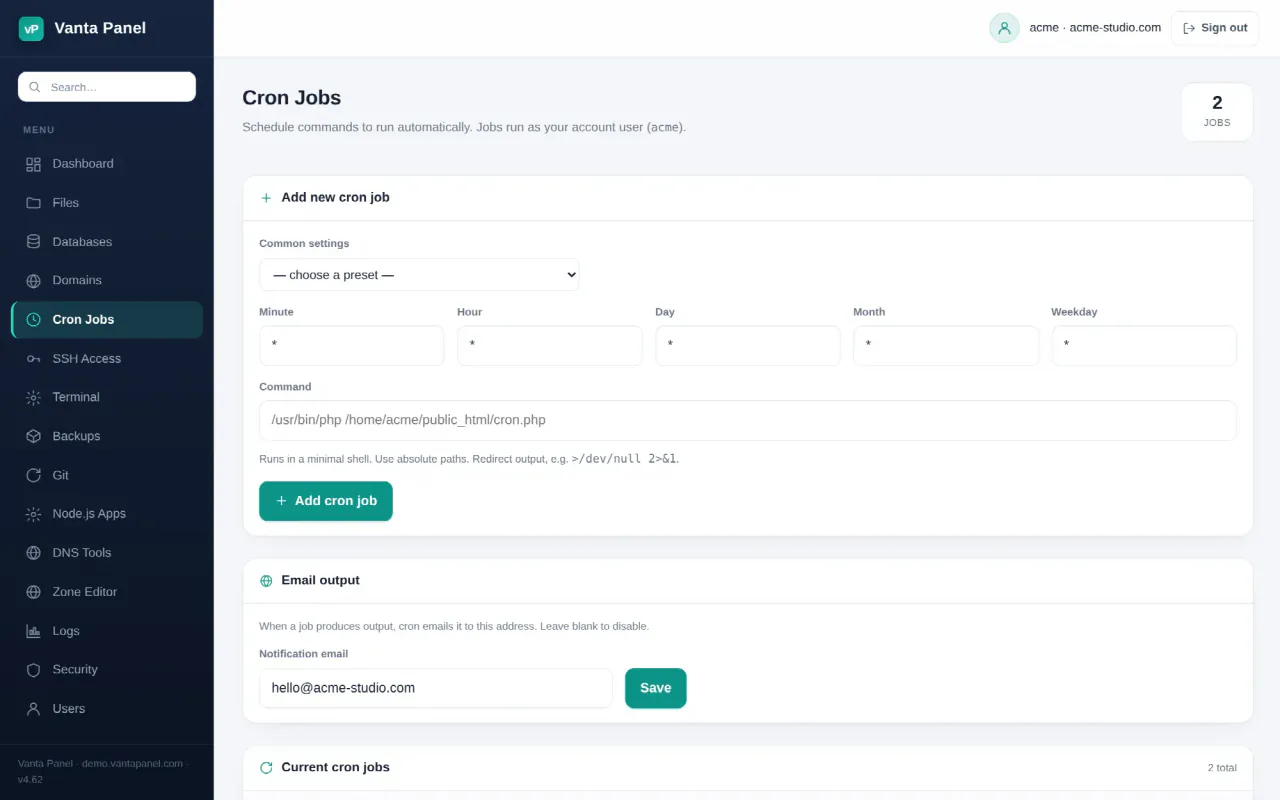
Cron Jobs (vPanel → Cron Jobs, also on the Dashboard under Software & Advanced) schedules commands to run automatically — every few minutes, nightly, weekly. Vanta Panel writes the entries into your account's own crontab, so each job runs as your account user with exactly your file permissions, never as root. On top of standard Linux cron the page adds presets, validation, an email address for output, an Edit flow and a Run now button.
Prerequisites
- A hosting account. A delegated login needs the Cron jobs permission (User Manager).
- A command that runs without a terminal: a PHP script, a shell script, or
curlfetching a URL. - SSH is not required; cron keeps working for accounts with SSH access switched off.
Adding a job
- Open Cron Jobs. The form is titled Add new cron job.
- Pick a schedule from Common settings, or type the five fields yourself — Minute, Hour, Day, Month, Weekday. Each defaults to
*, meaning "every". - Enter the Command. Use absolute paths: cron runs it in a minimal shell with almost no
PATH. - Click Add cron job. You see Cron job added. and the job is listed under Current cron jobs with its Schedule and Command.
Presets
| Preset (as labelled) | Cron fields |
|---|---|
| Every minute | * * * * * |
| Every 5 minutes | */5 * * * * |
| Every 15 minutes | */15 * * * * |
| Once an hour | 0 * * * * |
| Once a day (midnight) | 0 0 * * * |
| Daily at 2am | 0 2 * * * |
| Once a week (Sunday) | 0 0 * * 0 |
| Once a month | 0 0 1 * * |
Schedule format
Each field accepts *, a number, a range (1-5), a list (1,15) or a step (*/10). Names such as mon or jan are not accepted — the server answers Failed: invalid schedule field "mon" — and there is no seconds field, so once a minute is the fastest cron goes. Weekday 0 is Sunday. Times follow the server's clock.
Command examples
Replace youraccount with your username; each example discards output so you are not emailed every run.
| Task | Command |
|---|---|
| Run a PHP script | /usr/bin/php /home/youraccount/public_html/cron.php >/dev/null 2>&1 |
| Use a specific PHP version | /usr/bin/php8.3 /home/youraccount/public_html/cron.php >/dev/null 2>&1 |
| WordPress scheduled tasks | /usr/bin/php /home/youraccount/public_html/wp-cron.php >/dev/null 2>&1 |
| Fetch a URL | /usr/bin/curl -fsS https://yourdomain.com/cron.php >/dev/null 2>&1 |
| Keep a log instead | … >> /home/youraccount/cron.log 2>&1 |
/usr/bin/php is the default command-line PHP on a Vanta Panel server; versioned binaries such as /usr/bin/php8.3 exist for every version installed under PHP Versions. If a script depends on its working directory, start the command with cd /home/youraccount/public_html &&.
Email, editing and running on demand
- Email output — enter a Notification email and click Save. The panel puts a
MAILTOline at the top of your crontab, and whenever a job prints anything cron mails it there (Cron output will be emailed to you@example.com.). Clear the box and save to turn it off. - Edit — loads the job into the form (now titled Edit cron job). Change anything and click Save changes, or Cancel edit.
- Run now — runs the command immediately as your user with a 30-second limit and shows Ran job (exit 0). plus the first 300 characters of output. Run now uses a login shell with a fuller
PATHthan real cron, so a job that works here but never runs on schedule almost always needs absolute paths. - Delete — removes the job after a confirmation. If the job is still listed after you confirm (a known issue in current releases that is being fixed), remove it from the Terminal by filtering it out of your crontab with a string unique to that job:
crontab -l | grep -v 'cron.php' | crontab -.
Limits: crontab at most 64 KB; a Run now command at most 4096 characters.
Troubleshooting
- The job never runs — check the schedule (five fields, numbers only), then spell out absolute paths for both the interpreter and the script. Append
>> /home/youraccount/cron.log 2>&1temporarily to capture errors; the Logs page shows Apache logs only. - Permission denied — the script must be readable (and, for shell scripts, executable) by your account user. Fix it in the File Manager.
- Works with Run now, not on schedule —
PATH; write/usr/bin/php,/usr/bin/curland so on in full. - No email arrives — the job produced no output, output is redirected, or the mail is not getting through; see Email Deliverability.
FAQ
Which user runs my cron jobs?
Your own account user, from your own crontab. Files a job creates are owned by you.
Can I run a job every 30 seconds?
No. Cron's smallest interval is one minute. For anything faster, run a long-lived process as a Java, Node.js or Python app.
Do cron jobs migrate from cPanel?
Yes. The Vanta Panel cPanel importer installs the old crontab with /home/olduser paths rewritten and cPanel-internal jobs skipped.
Something missing or out of date? Ask support, or try it yourself on the live demo.