
Git Deployments on Your VPS
Clone a Git repository into your Vanta Panel hosting account, pull updates with one click, and deploy it to a domain — with every limit and error fix.
On this page 6 sections
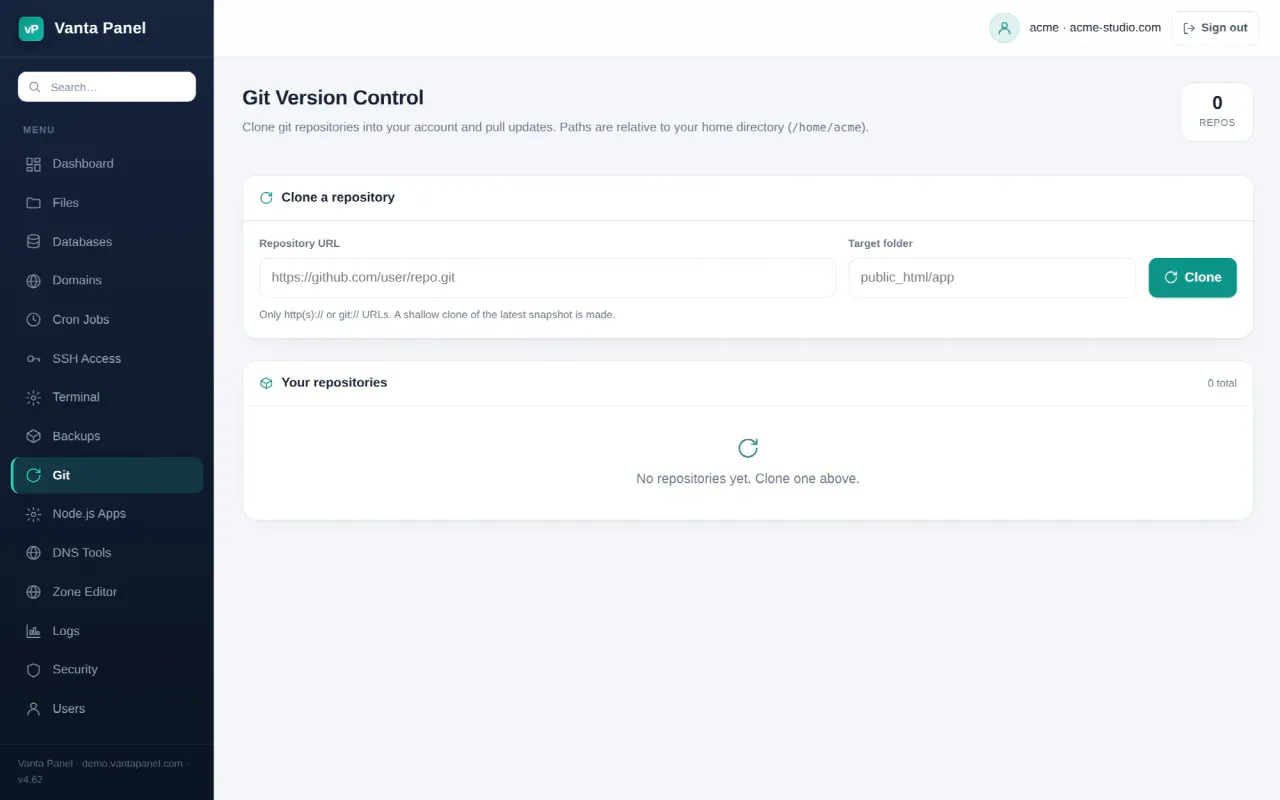
Git (vPanel → Git; the page is headed Git Version Control) clones a repository from a public http(s):// or git:// URL into a folder under your home directory and lets you pull updates with one click. It is deliberately simple: a shallow clone of the repository's default branch, fast-forward-only pulls, and files owned by your account user. There is no branch picker, no SSH-key or token field and no post-deploy script — for anything beyond clone-and-pull you use the same git command over SSH or in the browser Terminal.
Prerequisites
- A hosting account on Vanta Panel. The Git page is in every account's sidebar; a delegated login needs the Git permission (User Manager).
- A repository the server can fetch without being asked for credentials — a public repository.
ssh://andgit@URLs are refused. - The
gitpackage on the server. If a clone fails sayinggitcannot be found, an administrator installs it withapt install git.
Cloning a repository
- Open vPanel → Git.
- Under Clone a repository, enter the Repository URL, for example
https://github.com/user/repo.git. Anything other thanhttp://,https://orgit://is rejected with Enter an http(s):// or git:// repository URL. - Enter the Target folder, relative to your home directory (
/home/youraccount), for examplepublic_html/app. The folder must not exist yet, its parent must already exist, and..is not allowed. - Click Clone. The panel runs
git clone --depth 1— the latest snapshot of the default branch, not the full history — and makes your account user the owner of every file. You see Cloned into public_html/app.
The repository then appears under Your repositories with its Folder, Source URL and Branch / last commit (short hash, message and relative age, read live from the working copy).
Pulling updates and removing
- Pull runs
git pull --ff-onlyin that folder and reports Updated public_html/app: … with the first 120 characters of git's output. It never merges: if the remote branch was force-pushed or rewritten, the pull fails and the fix is to Remove and clone again. - Remove asks Remove public_html/app and its files? and deletes the whole folder — working files included, not just
.git— and drops the entry from the list.
Where the files land, and deploying a site
Everything goes to /home/youraccount/<Target folder>. Because Vanta Panel's form refuses a folder that already exists, it cannot clone straight into public_html or into an existing subdomain or addon-domain document root (public_html/<label> and public_html/<domain>, created when you add the domain — see Websites and Domains).
| Goal | How |
|---|---|
App at https://yourdomain.com/app | Clone into public_html/app from the Git page |
| Repository at the root of a domain | From SSH or the Terminal: cd ~/public_html && git init && git remote add origin URL && git pull origin main |
| Private repository | Deploy from the shell with a deploy key (below) |
Repositories set up from the shell are not listed on the Git page — it only knows about repositories it cloned itself.
Two cautions. The panel adds no Apache rule hiding .git, so a repository under public_html exposes its history over HTTP unless you block it; document roots honour .htaccess, so add one containing RedirectMatch 404 /\.git. And a token pasted into an https://user:token@… URL is stored and shown in plain text in the Source column — do not do that. For a private repository, generate a key inside your account (ssh-keygen -t ed25519 in the Terminal or over SSH), add the .pub half as a read-only deploy key on GitHub or GitLab, and clone with the git@ URL from the shell.
Troubleshooting
- Clone failed: … destination already exists — choose a new folder name, or Remove the old repository first. A folder created in the File Manager counts too.
- Clone failed: … parent folder does not exist — create the parent (for example
apps) in the File Manager, then clone intoapps/site. - Clone failed: … could not read Username / Authentication failed — the repository is private. Use the deploy-key route above.
- Pull failed: … Not possible to fast-forward — history was rewritten upstream. Remove and clone again.
- files missing on a repository row — the folder was deleted outside the panel. Remove cannot clean it up (it needs the folder to exist); clone the same URL into the same Target folder again and the entry is reattached.
- Nothing changes after a pull — Pull only updates files; run
composer install,npm run buildor migrations yourself from the Terminal (30-second limit per command) or over SSH.
FAQ
Can I pick a branch or tag?
Not from the panel; it always clones the default branch. For another branch, clone from the shell with git clone --branch name URL folder.
Does it deploy automatically when I push?
No. Vanta Panel has no webhook endpoint. Click Pull after you push, or run git pull from a cron job.
Are cloned repositories included in backups?
Yes. They live in your home directory, which account backups archive, .git folder included.
Does the clone use my SSH key?
No. Keys on the SSH Access page let you log in; the panel's clone never presents a key.
Something missing or out of date? Ask support, or try it yourself on the live demo.