 Vanta Panel
FTP Accounts
Create extra FTP logins for your account, each locked to one folder. Covers usernames and passwords, connecting with explicit FTP over TLS on port 21, why you must use the server's IP rather than a Cloudflare-proxied domain, and why FTP accounts cannot use SFTP.
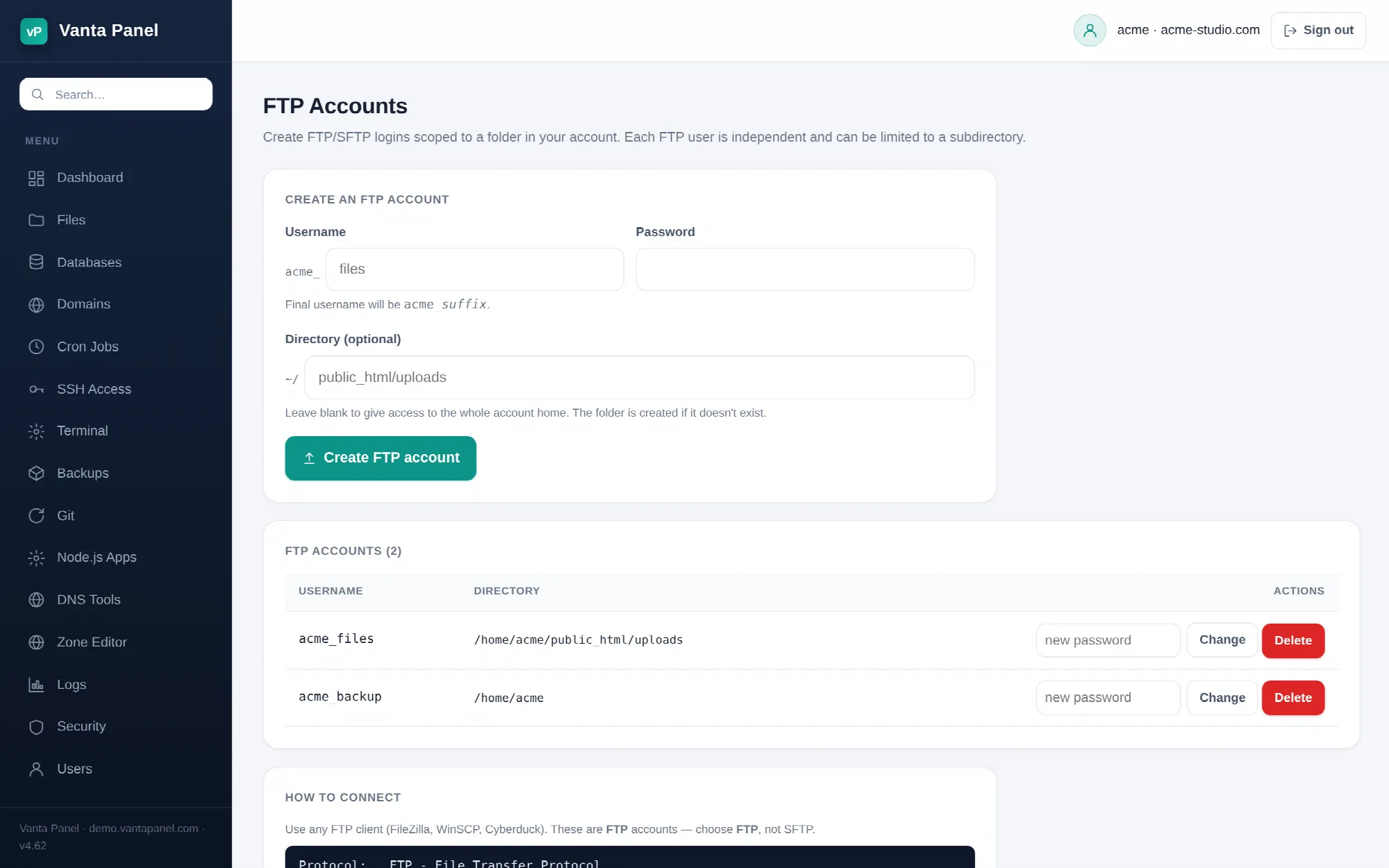 Creating and managing FTP accounts in vPanel.
FTP Accounts (vPanel → Dashboard → Files → FTP Accounts) creates extra FTP logins for your hosting account, each one locked to a folder you choose. Use them to give a designer access to one site folder, or to point an FTP-based deployment tool at a single directory, without handing over your main account password.
Creating an account
Pick a suffix and a password. The username you get is always your account name plus an underscore plus the suffix — if your account is alice and you enter files, the login is alice_files. The suffix may be 1–16 lowercase letters and numbers, and the finished username cannot exceed 32 characters. Passwords must be 8–128 characters.
Directory is optional and is taken relative to your home directory. Enter public_html/uploads and the account is confined to that folder; leave it blank and the account gets your whole home directory. The folder is created for you if it does not exist yet, owned by you.
Behind the scenes each FTP account is a real Linux user in your account's group, created with /usr/sbin/nologin as its shell and its home set to the folder you chose. That is deliberate: an FTP account can move files but can never open a shell.
Connecting
FTP accounts are for FTP, with explicit TLS. In FileZilla, WinSCP or Cyberduck:
| Setting | Value |
|---|---|
| Protocol | FTP — File Transfer Protocol |
| Encryption | Require explicit FTP over TLS |
| Host | your server's IP address |
| Port | 21 |
| Username | <youraccount>_<suffix> |
| Password | the one you set |
The page shows your server's actual IP address, and you should use it. Two reasons this matters:
- Do not use a Cloudflare-proxied domain as the host. Cloudflare proxies web traffic only. An FTP connection to a proxied hostname will not reach your server. In FileZilla you can type
ftp://<server-ip>into the Host box to force plain FTP. - Accept the server's certificate when your client prompts you the first time.
FTP accounts cannot use SFTP
This trips people up, so it is worth being blunt: these logins have no shell, and SFTP is a subsystem of SSH, so SFTP will not work with an FTP account. If you want SFTP, use your main account instead — authorize a key on the SSH Access page and connect with sftp <youraccount>@<server>. SFTP gives you your whole home directory; an FTP account gives you one folder.
Changing a password or deleting an account
The list shows every FTP account with the directory it is confined to. Type a new password next to an account and press Change to reset it. Delete removes the Linux user.
Deleting an FTP account does not delete its folder or any files in it — only the login goes away. So removing an account you created for a contractor is safe: the work stays.
Vanta Panel keeps its own record of the FTP accounts belonging to each hosting account, in /etc/vantapanel/ftp/<account>.list. Delete refuses any username that is not in that list. Change is guarded slightly differently: it requires the username to begin with your own account name plus an underscore. Either way, one customer cannot touch another customer's FTP logins even by guessing usernames.
Alternatives
For most day-to-day work you do not need FTP at all:
- The File Manager handles browsing, editing, uploads and archives directly in the browser — though uploads stop at 64 MB until an administrator raises the server's PHP limit, and downloads there are capped at 2 MB.
- SSH and SFTP is faster and encrypted end to end for bulk transfers.
- Git deployments beat uploading files by hand for anything you keep in version control.