
Email Hosting and Mailboxes
Create and manage mailboxes on your own domains with Postfix and Dovecot: address rules, passwords, quotas, the mailbox limits that really apply, mail DNS and the Brevo sending key. The hub for every email page in Vanta Panel.
On this page 8 sections
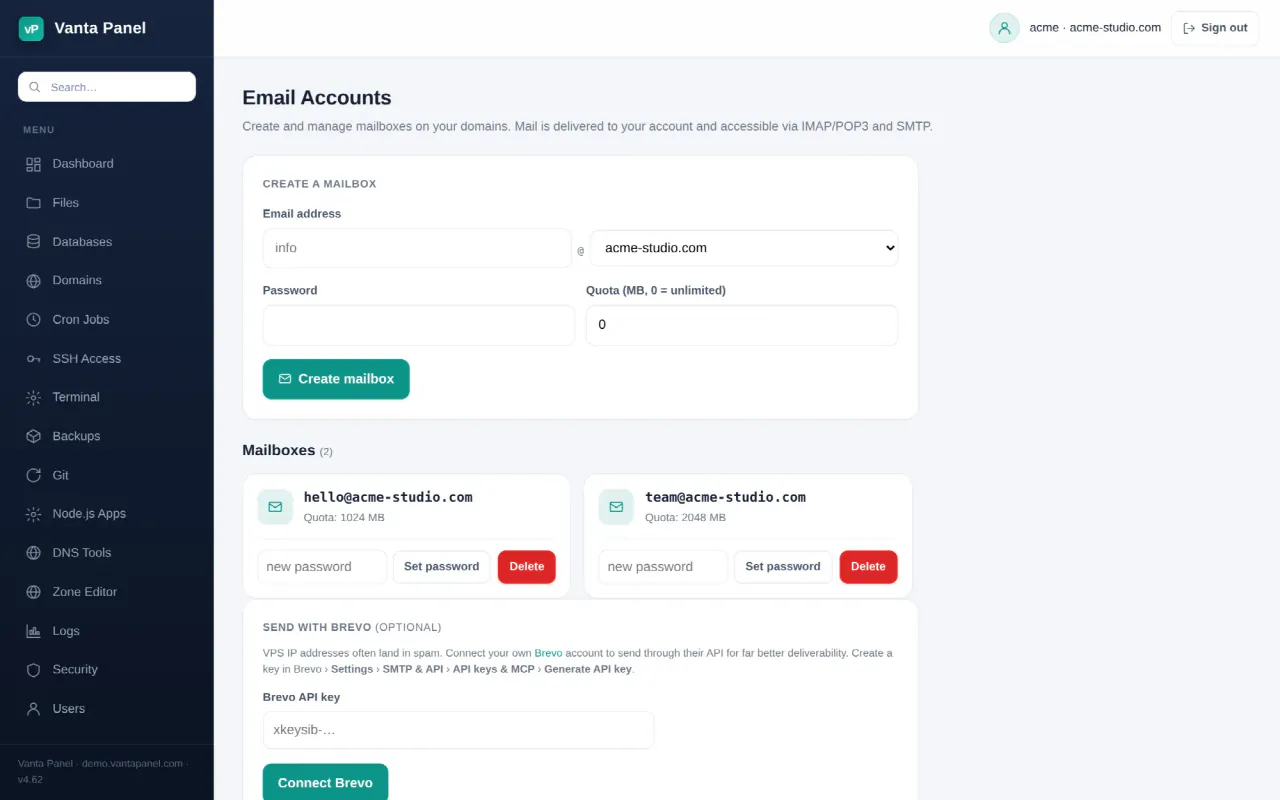
Email Accounts (vPanel → Email Accounts) creates and manages the mailboxes on your domains. Vanta Panel installs a complete mail stack — Postfix for SMTP and Dovecot for IMAP, POP3 and local delivery — so mail for your domains is received, stored and sent by your own server.
This page is the hub for the whole email area. Each sub-feature has its own page:
| Page | What it does |
|---|---|
| Mail client setup | Hostnames, ports and per-device settings for Outlook, Apple Mail, Gmail and Thunderbird |
| Email deliverability | SPF, DKIM, DMARC, reverse DNS, blocked port 25, outbound relay |
| Webmail | Read and send mail in the browser through Roundcube |
| Forwarders | Send mail arriving at one address on to another, including catch-alls |
| Autoresponders | Vacation / out-of-office automatic replies |
| Email filters | Per-mailbox rules that file, forward or delete incoming mail |
| Mailing lists | One address that fans out to a group of people |
| Spam filters | SpamAssassin scoring and what happens to flagged mail |
| Mail queue | vWHM: what is waiting to be delivered, and why |
How the mail stack fits together
Mailboxes and forwarders are rows in the panel's database. Postfix and Dovecot read that database directly through SQL maps, so a change you make in the panel takes effect on the next message — there are no per-domain config files to regenerate.
Mail itself is stored in Maildir format inside your account's home directory, at ~/mail/<domain>/<mailbox>/. Two consequences follow from that:
- Stored mail counts towards your account's disk usage, the same as website files.
- Deleting a mailbox in the panel deletes that directory, and every message in it, from the server.
Incoming mail is handed from Postfix to Dovecot over LMTP. That is the step where your filters and autoresponder run, which is why both only affect newly delivered mail.
Creating a mailbox
Fill in the address, a password and a quota:
- Address — the part before the
@must be lowercase and may contain only letters, digits,.,_and-, up to 64 characters. The domain list contains every domain on your account, including addon domains and subdomains. - Password — at least 8 characters. It is stored as a
{SHA512-CRYPT}hash for Dovecot to authenticate against, plus a separate reversibly encrypted copy that exists only so Webmail can sign you in with one click. - Quota (MB) —
0means unlimited. See the note below on what the quota actually does.
An email address can exist only once on the whole server, so if another account on the same server already owns info@example.com, creation is refused. The panel also creates the maildir (cur, new and tmp) as your account user with mode 0700 before inserting the row, so a mailbox that appears in the list always has storage behind it.
How many mailboxes you can have
Two separate limits are in play, and only one of them blocks you.
The licence limit is enforced. On the free tier the panel refuses to create a second mailbox for an account and tells you so. A paid licence is $10 per server per month for unlimited accounts, mailboxes and databases — see Activating your license.
Your package also has a Max email accounts value set by the server administrator. That figure drives the Email Accounts statistic and a warning on your vPanel dashboard when you reach it, but it does not itself stop a mailbox being created.
Quotas are reported, not enforced
The quota you set is a reporting figure. Each mailbox card shows the measured size of the maildir against it, with the bar turning amber past 70% and red past 90%. Nothing rejects incoming mail when a mailbox goes over its quota — the mail keeps arriving and keeps consuming your account's disk space. Treat the quota as a warning light, and watch your account's overall disk usage as the real ceiling.
Changing a password or deleting a mailbox
Each mailbox card carries its own controls. Set password replaces the stored hash (minimum 8 characters again) and takes effect on the next login — mail clients already connected will start failing authentication until you update them. Delete removes the mailbox and its entire maildir after a confirmation prompt. There is no undo and no trash; take a backup first if the mail matters.
Sending from your website: the Brevo card
The Send with Brevo card on this page is for application sending, not for the mail server. You paste a Brevo API key, the panel verifies it against Brevo's API and stores it encrypted, then shows the connected account label. Send test email sends one message through Brevo's API to an address you type, from the verified sender on your Brevo account.
The point of the card is the key itself: reveal it with Show, copy it, and paste it into your site or a plugin (for example the official Brevo plugin for WordPress) so your application's mail leaves through Brevo's reputation instead of a fresh VPS IP. Connecting a key here does not re-route mail that Postfix sends. If you want the server's own outgoing mail to go through a provider, use the outbound relay on the Email deliverability page.
If Brevo rejects the connection with an unauthorised-IP error, add the server's IPv4 address under Brevo → Settings → Security → Authorised IPs and save again.
Mail DNS
Mail cannot reach a new mailbox until the domain's DNS points at the server. Set up mail DNS automatically on this page runs the same one-click provisioning as Set up email DNS in the Zone Editor: an A record for mail.<domain> at the server IP, an MX at priority 10 pointing to it, an SPF TXT, a DKIM key published at vanta._domainkey, and a _dmarc record with p=none. Existing matching records are left alone, so it is safe to run twice.
It needs the server's DNS automation (Cloudflare) to be configured; if it is not, the panel says so and you add the records at your own DNS provider instead. On Cloudflare, the mail record must stay DNS only — the grey cloud. Mail cannot pass through Cloudflare's proxy.
Mail client settings
The page prints the settings for your primary domain: mail.<your-domain> as both incoming and outgoing server, IMAP on 993, POP3 on 995, SMTP on 587, username = the full email address. Download setup guide produces a self-contained HTML file with step-by-step instructions for iPhone, Android and desktop clients, filled in with your own domain. Mail client setup covers the same ground, plus the certificate and firewall details.
Something missing or out of date? Ask support, or try it yourself on the live demo.