 Vanta Panel
Email Deliverability: SPF, DKIM and DMARC
Fix mail that never arrives: live SPF, DKIM and DMARC checks with the exact records to publish, reverse DNS, blocked outbound port 25, an authenticated outbound relay, and the one-click repair for mail held with 451 Service unavailable.
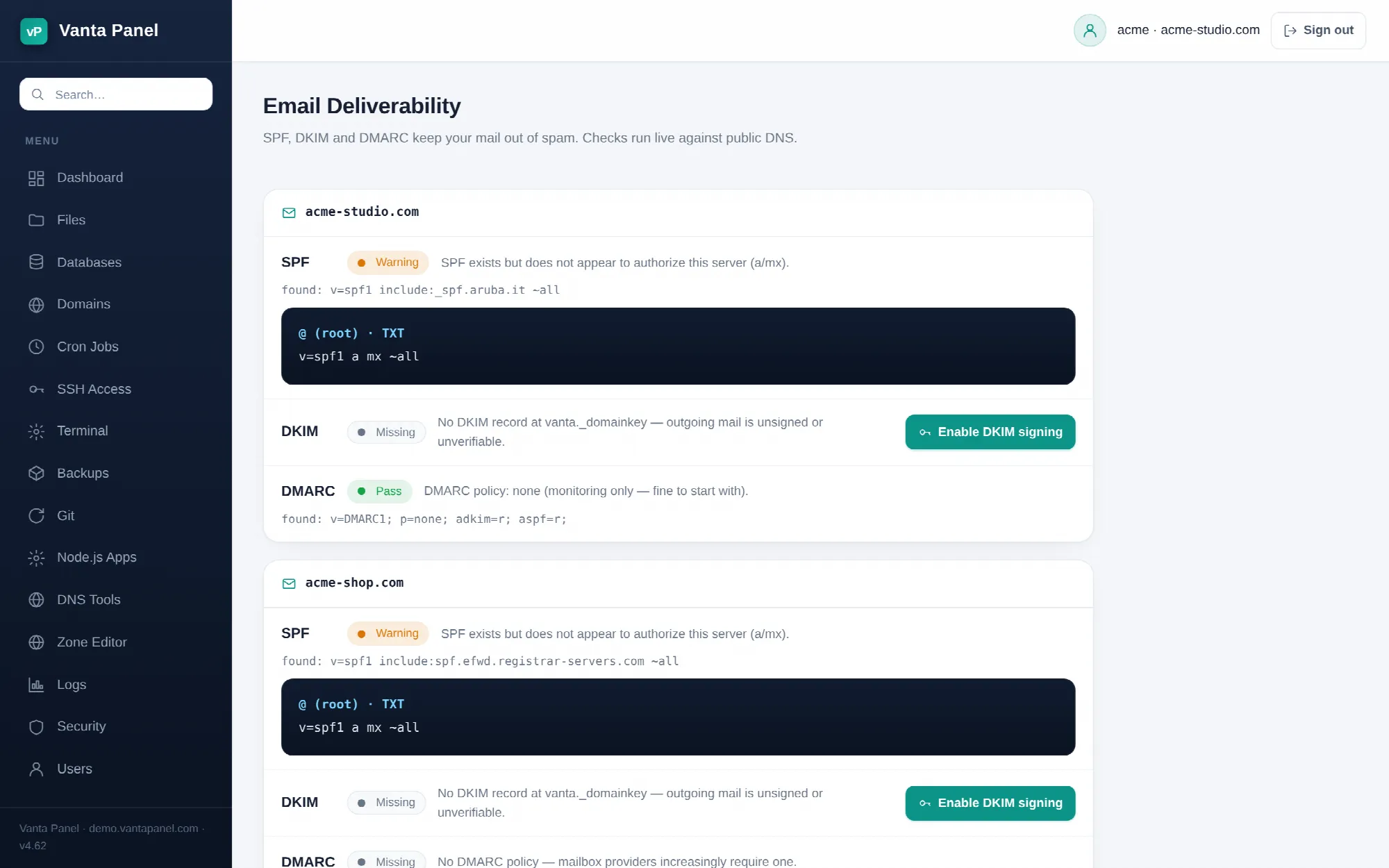 Live SPF, DKIM and DMARC checks in vPanel.
Email Deliverability (vPanel → Email Deliverability) is where you fix mail that leaves your server and never arrives, or arrives in the spam folder. Every check on the page is a live lookup performed while the page loads — nothing is cached — and each row is labelled Pass, Warning or Missing with the record it actually found.
Work down the page in order. The first two panels are about the server and affect every domain on it. The per-domain panels below them are about DNS records.
Sending server
Repair mail sending
If sending a message fails with 451 4.7.1 Service unavailable — try again later, mail is not being rejected — it is being held because Postfix is configured to hand every message to the OpenDKIM milter and OpenDKIM is not answering where Postfix expects.
Repair mail sending fixes that without SSH. It forces OpenDKIM's socket to inet:8891@127.0.0.1 (including in Ubuntu's /etc/default/opendkim, which otherwise overrides opendkim.conf), repairs ownership and permissions on /etc/opendkim so the signer can read its own keys, forces OpenDKIM's failure actions to accept so a signing problem can never hold mail again, and restarts the service. The result message tells you whether DKIM signing came back up or whether mail will simply flow unsigned for now — either way the queue starts moving.
Reverse DNS
The panel looks up the PTR record for the server's IP. No PTR, or a PTR that is just the IP again, is the single most common cause of "sent but never arrived": Gmail and most large providers reject or junk mail from an IP with no reverse DNS.
Only the owner of the IP can set this, which means your VPS or hosting provider — not the panel and not your DNS provider. When the record is missing the page prints the exact request to send them, in the form set reverse DNS for <ip> to mail.<your-domain>. If a PTR exists but does not match your mail host, the row warns rather than fails; mail usually still gets through, but matching it is better.
Outbound SMTP
The panel opens a test connection on port 25 to Google's and Microsoft's public mail exchangers. If none of them answer, outbound port 25 is blocked — which many VPS providers do by default on new accounts. Blocked port 25 means your mail is accepted by your own server, queued, and never delivered anywhere.
You have two ways out: ask the provider to unblock outbound port 25, or use the relay below.
Outbound relay
The relay sends your outgoing mail through an authenticated SMTP provider over port 587 instead of delivering it directly. That both bypasses a blocked port 25 and borrows the provider's sending reputation.
It is configured per account: the panel applies it only to the domains your own account owns, and leaves Postfix's global relayhost empty, so other accounts on the server keep delivering directly.
Fill in the host, port, username and password. The panel then writes a sender-dependent relay map keyed on @yourdomain, stores the credentials in a separate root-only map, requires TLS on the connection, reloads Postfix and flushes the queue so mail already held starts retrying immediately.
Any SMTP provider works. Two that people commonly have:
- Brevo (free tier) — host
smtp-relay.brevo.com, port587, username = your Brevo account email, password = an SMTP key from Brevo → SMTP & API → SMTP. Note that this is a different credential from the API key used by the Send with Brevo card on the Email Accounts page. - Gmail —
smtp.gmail.comport587with an app password.
Stop using the relay removes only your own domains' entries and returns them to direct delivery. If port 25 is still blocked, mail will start failing again, so leave the relay in place unless the provider has actually unblocked it.
SPF, DKIM and DMARC per domain
Below the server panels there is one panel per domain on your account — your main domain and any addon domains. Subdomains are not listed, because mail authentication is a property of the parent domain.
SPF
SPF tells receivers which hosts may send mail for your domain. The recommended record is a TXT at the domain root:
v=spf1 a mx ip4:<your server IP> ~allThe check passes when the existing record contains an a or mx mechanism, or an ip4: entry for this server's IP. A record that exists but authorises none of those gets a Warning — that is what you see after moving a domain to a new server and leaving the old SPF behind.
The one-click Set up email DNS in the Zone Editor writes v=spf1 a mx ~all instead, without the ip4: term. That also passes, because a and mx resolve to this server. Either form is fine; do not publish two SPF records for the same domain.
DKIM
DKIM signs outgoing mail with a private key on the server and publishes the matching public key in DNS. Vanta Panel uses OpenDKIM with the selector vanta, so the record lives at vanta._domainkey.<domain>.
Enable DKIM signing does all of the server-side work: installs OpenDKIM if it is missing, generates a 2048-bit key for the domain under /etc/opendkim/keys/<domain>, registers it in OpenDKIM's key and signing tables, wires the milter into Postfix at inet:127.0.0.1:8891 for both SMTP and locally injected mail, sets Postfix's milter_default_action to accept so a signing failure can never block mail, and restarts the signer.
Then the DNS side. If the server has DNS automation configured, the panel publishes the record for you and says so; if not, it prints the record for you to add at your DNS provider:
vanta._domainkey TXT v=DKIM1; h=sha256; k=rsa; p=<public key>A Warning on this row with the note that the key does not match means a vanta._domainkey record exists but its p= value is not the key this server holds — typically a leftover from a previous server. Re-apply DKIM and republish the record the page now shows.
DMARC
DMARC tells receivers what to do when SPF and DKIM fail, and where to send reports. Any valid record counts as a pass, and the row reports the policy it found. The recommended starting record is:
_dmarc TXT v=DMARC1; p=none; rua=mailto:postmaster@<domain>p=none is monitoring only — it changes nothing about how your mail is treated, which is exactly what you want while you confirm SPF and DKIM are passing. Tighten it to quarantine and then reject later, by hand, in the Zone Editor. If the administrator has set a server-wide DMARC reporting address, the Publish recommended record button uses that instead of postmaster@.
When the publish buttons are missing
Publish recommended record appears for SPF and DMARC only when the server has DNS automation (Cloudflare) configured. Without it, the page says so and you copy the recommended values to your own DNS provider — the checks then turn green on the next page load once DNS has propagated. The DKIM button is always available, because the part that needs the server is the signing key, not the record.
The order that actually works
- Reverse DNS — nothing else compensates for a missing PTR.
- Outbound port 25, or a relay if the provider will not open it.
- SPF, then DKIM, then DMARC.
- Send a test message to a Gmail address, open it, and use Show original to confirm SPF and DKIM both say
PASS.
If mail is still stuck after all five rows are green, the administrator can see exactly what is waiting and why in vWHM → Mail Queue.