
Using the API
Issue scoped, revocable API tokens in vWHM and manage hosting accounts over a bearer-authenticated REST API. Covers scopes, the rate limit, endpoints and error codes.
On this page 6 sections
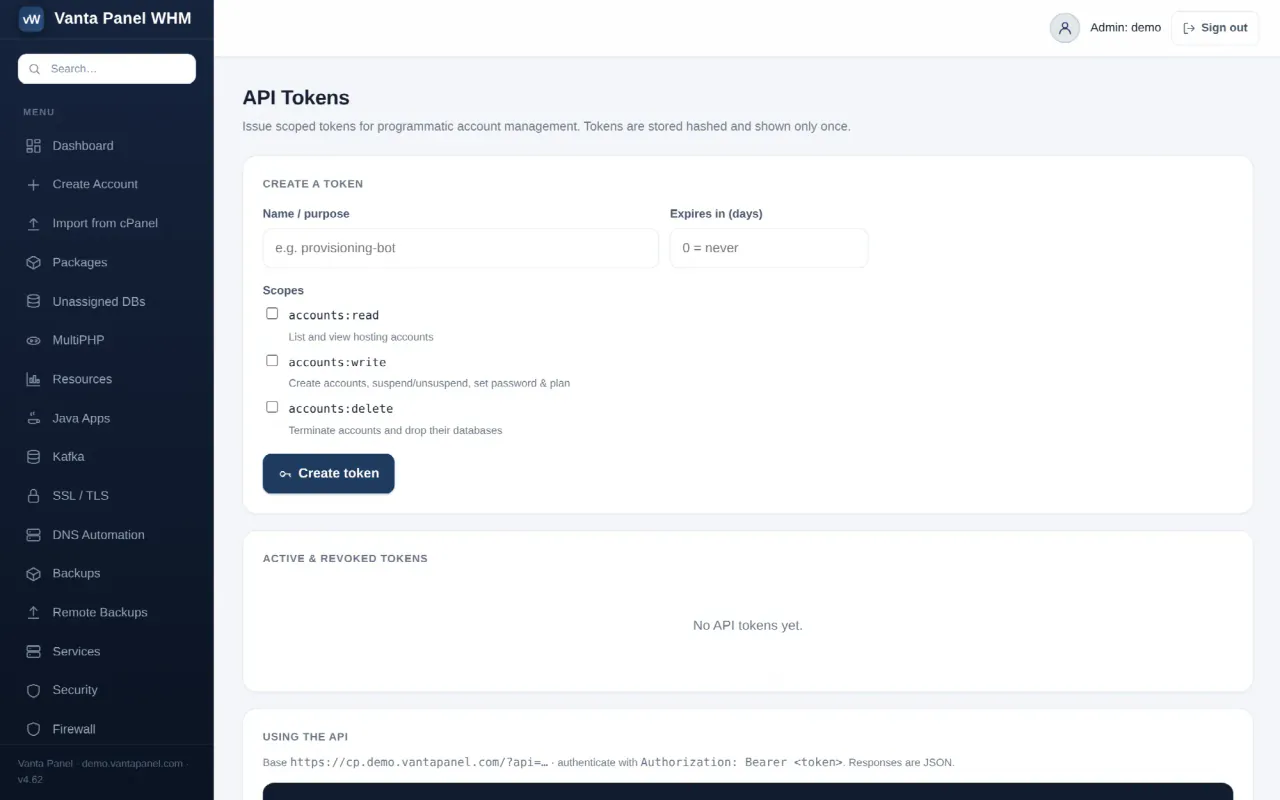
Vanta Panel includes a REST API for account management, authenticated by bearer token. It is what you use to provision accounts from your own billing system instead of by hand.
Tokens are issued in vWHM → API Tokens. A second page, vWHM → API, is the in-panel endpoint reference.
Creating a token
The form takes three things:
- Name / purpose — letters, numbers, spaces,
.,_and-, up to 64 characters. Use something you will recognise in the audit log, such asprovisioning-bot. - Expires in (days) — optional.
0or blank means the token never expires. - Scopes — at least one is required. A token with no scope cannot be created.
The token is generated as vp_ followed by 40 alphanumeric characters, and it is displayed once, in a highlighted card with a copy button. Only a SHA-256 hash is stored, so nothing can recover it afterwards — if you lose it, revoke it and issue another.
Scopes
| Scope | Grants |
|---|---|
accounts:read | List and view hosting accounts |
accounts:write | Create accounts, suspend and unsuspend, set password, set or clear plan |
accounts:delete | Terminate accounts and drop their databases |
A call missing the required scope returns 403 insufficient_scope, and the response names both the scope required and the scopes the token actually has.
Managing tokens
The table lists every token, active first, with its name, who created it and when, the first 12 characters of the token as an identifier, its scopes, its expiry, and its status (active, expired or revoked).
Last used shows the timestamp and IP of the most recent successful call. Stamping usage is best-effort — a failure to record it never blocks the call — but in practice this column is how you spot a token nobody uses any more.
Two actions:
- Revoke — the token stops working immediately. The row stays, so the history is preserved. This is what you want in almost every case.
- Delete — removes the row entirely. A deleted token also stops working, but you lose the record of it having existed.
Creating, revoking and deleting tokens are all written to the audit log as token.create, token.revoke and token.delete. The creation entry records the scopes and expiry that were granted.
Authentication
The API is served from the customer-panel vhost, which has no HTTP Basic Auth in front of it. The base URL is your panel path with an api query parameter:
https://<your-domain>/vpanel/?api=pingSend the token on every request:
Authorization: Bearer vp_xxxxxxxxxxxxxxxxxxxxxxxxxxxxxxxxxxxxxxxxxIf your client or a proxy strips the Authorization header, send X-Api-Key: <token> instead — it is accepted as an equivalent.
Two checks run before your token is even looked up, and then the token itself is validated:
- HTTPS is required. A plaintext request is refused with
403 https_required. TLS terminated at Cloudflare or at Apache passes this check. - Rate limit: 120 requests per minute per IP. Exceeding it returns
429 rate_limitedwith aRetry-Afterheader. The counter is kept in a file rather than the database, specifically so a flood cannot add database load. - The token must exist, not be revoked, and not be expired.
Endpoints
| Method | Resource | Scope | What it does |
|---|---|---|---|
GET | ?api=ping | none | Returns the token's label, scopes and expiry |
GET | ?api=accounts | accounts:read | List every hosting account |
POST | ?api=accounts | accounts:write | Create an account |
GET | ?api=account&user=NAME | accounts:read | One account with its domains and databases |
POST | ?api=account&action=ACTION | accounts:write | Act on an account |
DELETE | ?api=account&user=NAME | accounts:delete | Terminate an account |
The ACTION values on that POST are suspend, unsuspend, password and plan. terminate is also accepted there as an alternative to the DELETE, and requires accounts:delete rather than accounts:write.
Parameters may be sent as a JSON body, as form fields, or in the query string; a JSON body takes precedence. ?api=whoami is an alias for ?api=ping.
Creating an account through the API is subject to the same license ceiling as creating one in vWHM. On the free tier the second call fails.
# verify a token
curl -H "Authorization: Bearer $TOKEN" \
  "https://example.com/vpanel/?api=ping"

# create an account (password generated and returned if omitted)
curl -X POST -H "Authorization: Bearer $TOKEN" -H "Content-Type: application/json" \
  -d '{"username":"cust12","domain":"cust12.com","plan":"Business"}' \
  "https://example.com/vpanel/?api=accounts"

# suspend it
curl -X POST -H "Authorization: Bearer $TOKEN" -H "Content-Type: application/json" \
  -d '{"user":"cust12"}' \
  "https://example.com/vpanel/?api=account&action=suspend"
Responses
Success is {"ok":true, ...}. Errors are {"ok":false,"error":"<code>"} with a matching HTTP status:
401 missing_token · 401 invalid_token · 401 token_expired · 403 insufficient_scope · 403 https_required · 404 for an unknown account · 405 method_not_allowed · 422 missing_user · 422 password_too_short · 429 rate_limited · 502 worker_failed when a privileged operation on the server itself failed, with the underlying reason in a detail field.
A generated password is returned exactly once, in the response to the call that generated it — either the account creation, or a password action called with no password supplied. There is no endpoint that retrieves it later. If you lose it, reset the password from the account's management screen — see Managing a hosting account.
Every mutating call is written to the audit log with the actor type api and token:<label> as the actor, so API-driven changes appear alongside changes made by hand.
Something missing or out of date? Ask support, or try it yourself on the live demo.