
Move off cPanel without rebuilding your accounts.
Vanta Panel’s vWHM includes an Import from cPanel tool: give it a cPanel account backup and it recreates the account’s Linux user, home directory, primary domain, databases and mailboxes on your new server. The old cPanel server is never modified.
The importer is in every tier try it on one account, free
The importer
What transfers, and what doesn’t?
Everything that lives in the account’s home directory and databases comes across: site files, the databases you choose, mailboxes with their old mail, cron jobs, and the database settings of WordPress, Laravel and Joomla sites. Mailbox passwords, custom DNS records, SSL certificates, addon domains and FTP accounts are set up again by hand.
| What | What happens |
|---|---|
| Imported automatically | |
| Website files | Restored under the new account’s home directory. |
| Databases | The ones you tick, streamed from the archive into MariaDB under their new names. |
| Mailboxes and old mail | Mailbox folders are recreated, with the messages stored in the home directory. |
| Cron jobs | Installed with their /home/olduser/… paths corrected. |
| App database settings | wp-config.php (WordPress), .env (Laravel) and configuration.php (Joomla) rewritten to the new credentials. |
| You redo by hand | |
| Mailbox passwords | cPanel’s password hashes are not portable: set a new password on each mailbox. |
| Custom DNS records | SPF, DKIM, an external MX or verification TXT records: recreate them before you switch. |
| SSL certificates | Issued fresh from Let’s Encrypt in one click once the domain points at the new server. |
| Addon domains and FTP accounts | Recreated on the new account. |
Three screens
How does the import work?
In three screens in vWHM. Pick the archive, review what Vanta Panel found in it and choose what to bring across, then let the import run in the background. Vanta Panel reads the archive without extracting it first, and the old account is never touched.
-
Pick the archive
Upload the cPanel backup on the Import page, or copy a large one over SSH into
/var/lib/vantapanel/cpimports/, where it is listed automatically. Select it and scan it.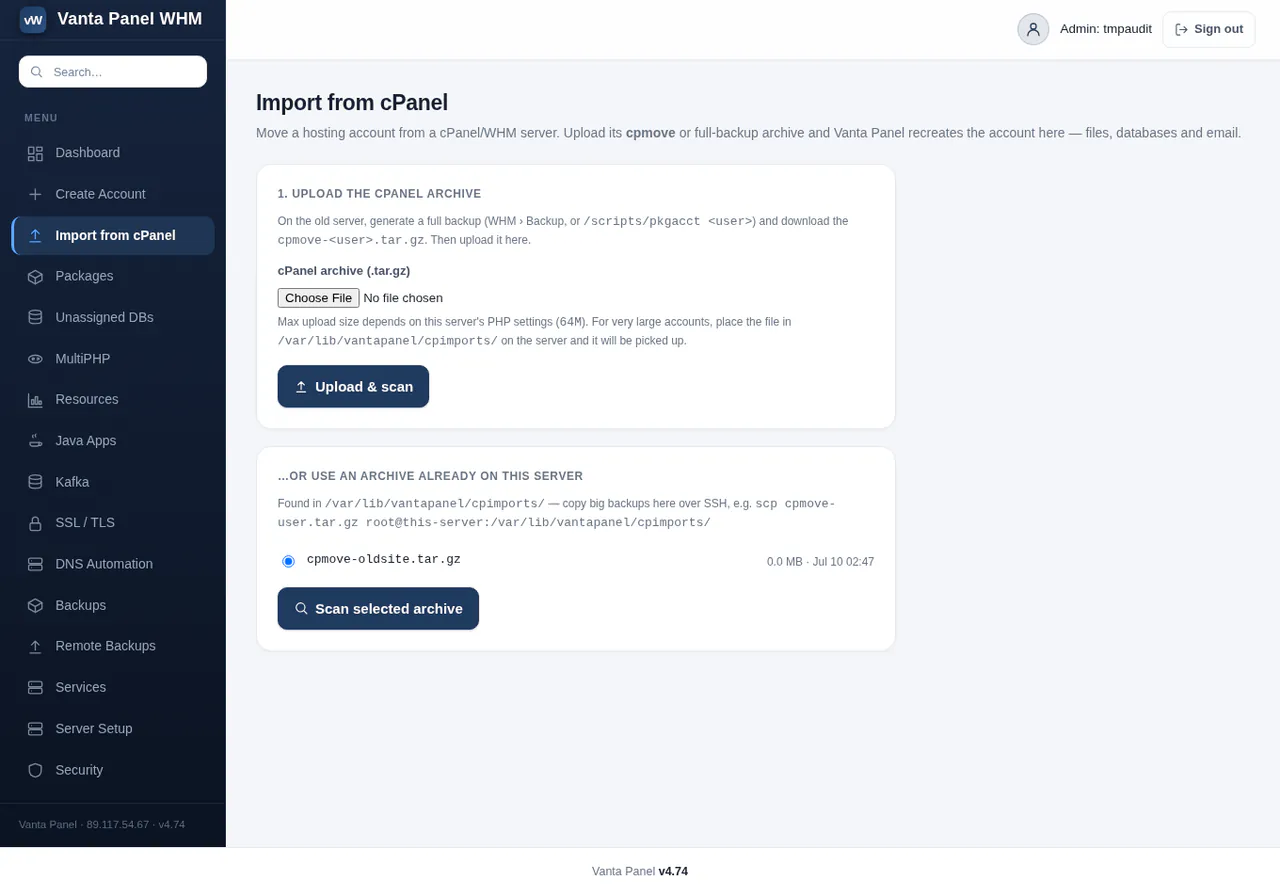
-
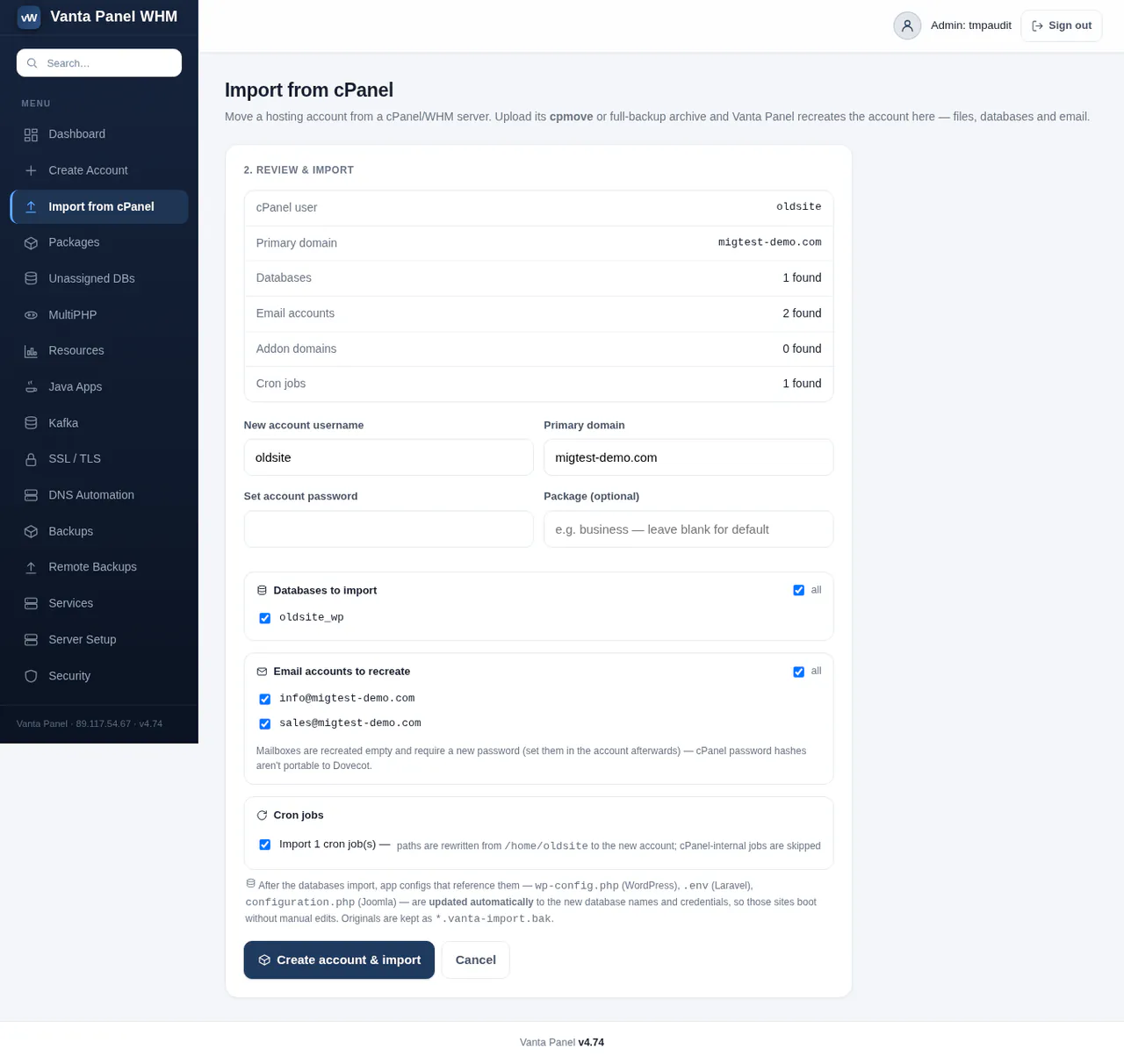
Review and choose
Vanta Panel shows the cPanel user, primary domain, databases, email accounts and cron jobs it found. Set the new username and password, tick what to import, and start.
-
Let it run, then check
Files are restored, databases streamed in, app configs rewritten and mailboxes recreated, with live progress. A report of every rewritten config is saved as
.vanta-import-report.txtin the account’s home.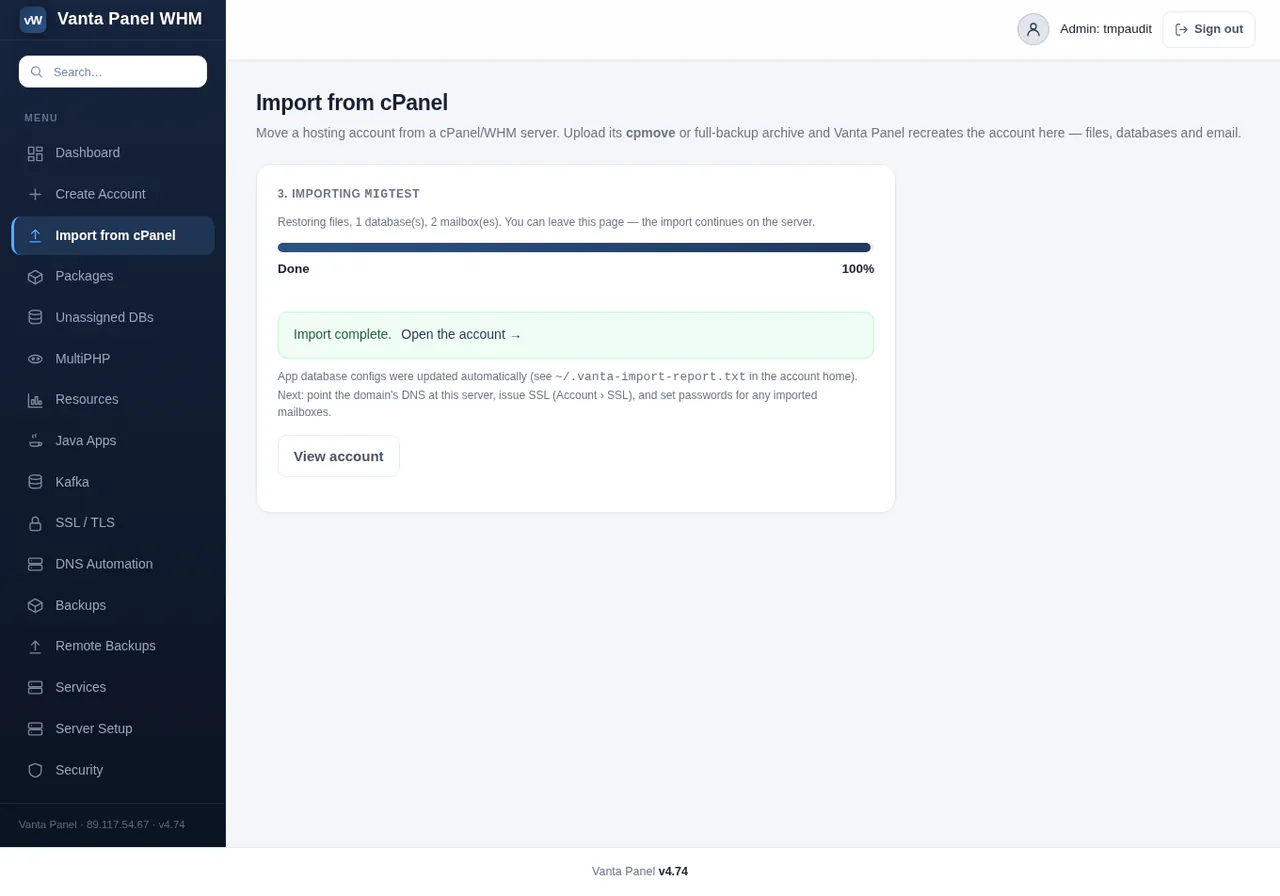
Real screenshots of vWHM’s Import from cPanel, from the migration guide’s test server, cropped to each step’s card. Try vWHM in the live demo
A glossary for switchers
Which cPanel terms map to which Vanta Panel terms?
Most of them keep their name. WHM becomes vWHM, the admin console you run the server from, and cPanel becomes vPanel, the panel your customers sign in to. The tools inside vPanel use the names cPanel users already know.
| In cPanel & WHM | In Vanta Panel |
|---|---|
| WHM, the server admin console | vWHM |
| cPanel, the customer’s panel | vPanel |
| A cpmove or full account backup | Import from cPanel, in vWHM |
| Packages | Packages, in vWHM |
| Nameserver settings | Server Setup and private nameservers |
| MultiPHP Manager | MultiPHP / Isolation, in vWHM |
| AutoSSL | SSL / TLS: Let’s Encrypt, renewed automatically |
| Zone Editor | Zone Editor, in vPanel |
| Email Accounts, Forwarders, Autoresponders | The same names, in vPanel |
| phpMyAdmin | phpMyAdmin, with single sign-on from vPanel |
| Backup | Backups: plain .tar.gz and .sql, local or remote |
| Terminal and SSH Access | Browser Terminal and SSH Access |
| API Tokens | API Tokens, in vWHM |
The runbook
How do you move a whole server?
One account at a time, with the old server serving throughout. Install Vanta Panel on the new server once, then package, copy, import and test each account, and move each domain only when its site is proven. It is a copy-based migration: nothing on the cPanel side changes, so not switching is your rollback.
Package the account
As root on the cPanel server, run cPanel’s own packager; the archive lands at
/home/cpmove-<user>.tar.gz. Without root, use Download a Full Account Backup instead./scripts/pkgacct mysiteCopy it server to server
Straight into the import drop-box on the new server, then check the
sha256summatches on both ends.scp /home/cpmove-mysite.tar.gz root@NEW-SERVER-IP:/var/ lib/ vantapanel/ cpimports/ Import in vWHM
Open Import from cPanel, select the archive, tick what to bring across, and let it run.
Test before you touch DNS
Point your own computer at the new server with one hosts-file line and click through the site properly: admin login, forms, checkout. Your customer’s live service has not changed yet.
Lower the TTL, then switch
Drop the TTL to 300 seconds a day ahead, recreate the custom DNS records, then change the A records, or move the nameservers to your own: the import already created the domain’s zone in vWHM. Issue the SSL certificate once the domain resolves to the new server.
The part nobody tells you
Steps 1 to 5 repeat for every account, so a 200-account estate is a scheduled project across evenings and maintenance windows. Mailbox passwords are what generate customer contact: write the email that tells customers to set a new one before you start.
Keep the old server for a few days
Leave the cPanel server running as your safety net while the new one serves real traffic, and cancel it only once nothing has gone wrong.
Every command and screen, in the guide Moving from another panel by hand
The cost of not moving
What does staying on cPanel cost?
cPanel’s licence rises with every account: at 200 accounts on one server its list price is $1,427.88 a year, against $120 for Vanta Panel Unlimited. The table shows the licence alone; the VPS costs the same either way.
| Accounts | cPanel per year | Vanta Panel per year | You keep per year |
|---|---|---|---|
| 1 | $359.88Solo | $0Free | $359.88 |
| 5 | $431.88Admin | $60Basic | $371.88 |
| 30 | $647.88Pro | $120Unlimited | $527.88 |
| 100 | $839.88Premier | $120Unlimited | $719.88 |
| 200 | $1,427.88Premier + 100 | $120Unlimited | $1,307.88 |
| 500 | $3,191.88Premier + 400 | $120Unlimited | $3,071.88 |
| 1,000 | $6,131.88Premier + 900 | $120Unlimited | $6,011.88 |
-
Try the import on the Free tier
Free covers 1 account, 1 mailbox and 1 database, with every feature, the importer included. Move your hardest account before you pay anything.
-
One flat price for the rest
Basic is $5 a month for 5 accounts; Unlimited is $10 a month per server, however many accounts you import.
- Work out your own numbers Running 50+ accounts? Hosting-company pricing
Questions
Questions about leaving cPanel
Stuck on an import? The guide has a troubleshooting section, or ask support.
Can I move my accounts from cPanel to Vanta Panel?
Yes. vWHM's Import from cPanel tool takes a cPanel account backup and recreates the account, including its Linux user, home directory, primary domain, databases, mailboxes and cron jobs. The old server is never modified. Mailbox passwords, custom DNS records such as SPF, DKIM or an external MX, SSL certificates, and addon domains or FTP accounts do not transfer: you set those up again afterwards, and certificates are issued fresh in one click.
Does a Vanta Panel import change anything on the old cPanel server?
No. The importer only reads the archive you give it, and that archive is made by cPanel's own packager or backup screen. The old server keeps serving every site until you move the domain, so if something is not right on the new server you simply do not switch: not switching is your rollback.
Can Vanta Panel import a whole cPanel server at once?
No. There is no bulk importer: each account is packaged, copied and imported on its own, so a large estate is a scheduled project across maintenance windows, not an afternoon. Large archives can be copied over SSH into /var/lib/vantapanel/cpimports/, which has no upload size limit, instead of going through the browser.
Do I need root on the cPanel server to migrate to Vanta Panel?
No. With root you can run /scripts/pkgacct for each account. Without root, the account owner can use Download a Full Account Backup in cPanel; it produces the same archive format, and Vanta Panel imports it the same way.
Do WordPress sites need editing after an import into Vanta Panel?
Usually not. The importer rewrites the database settings in wp-config.php (WordPress), .env (Laravel) and configuration.php (Joomla) to the new database names and credentials, keeps each original as a .vanta-import.bak file, and saves a summary in .vanta-import-report.txt in the account's home directory. For any other app, copy the new database details from vWHM into its config by hand.
Can Vanta Panel import accounts from panels other than cPanel?
No. The importer reads cPanel account backups only. A move from HestiaCP, Plesk, DirectAdmin or any other panel is manual: copy the files, export and import the databases, and recreate the mailboxes. The blog guide to migrating to Vanta Panel walks through that path.
Bring your accounts. Leave the per-account licence.
Install Vanta Panel free on a new VPS, import one cPanel account, and switch its domain only when the site is proven.
curl -fsSL https://get.vantapanel.com | sudo bash