 Vanta Panel
The cPanel alternative
that plugs straight into WHMCS.
Keep WHMCS exactly as it is. Swap what it provisions on. The free Vanta Panel module automates the whole account lifecycle — create, suspend, unsuspend, terminate, re-password, re-plan — over a scoped REST API. Your customers order and pay you; Vanta Panel does the provisioning.
Billing in WHMCS, provisioning in Vanta
Point a WHMCS product at your Vanta server once. From then on every order, suspension, upgrade and cancellation is applied to the panel automatically.
Automated provisioning
A new WHMCS order creates the hosting account on your Vanta server in seconds — username, domain, password and plan, with no manual steps.
The full billing lifecycle
Suspend on overdue, unsuspend on payment, terminate on cancellation, upgrade and downgrade between packages. WHMCS drives all of it through the module.
Scoped API token, not root
Talks to Vanta over HTTPS with a scoped API token as a Bearer header. No root credentials and no shared secret — create the token in vWHM, revoke it any time.
Resell under your own brand
Map each WHMCS product to a Vanta package and sell hosting as your own. Your customers order and pay you; Vanta Panel does the provisioning.
What actually changes in WHMCS
Less than people expect. You are replacing one server module with another; the billing side of WHMCS never learns that anything happened.
| In WHMCS | With cPanel | With Vanta Panel |
|---|---|---|
| Server Type | cPanel/WHM | Vanta Panel |
| Authentication | Root password or API token | Scoped API token as the Access Hash |
| Product module | cPanel | Vanta Panel |
| Package mapping | WHM package name | Vanta plan name |
| Port / path | Port 2087 | HTTPS, API path /api |
| Licence cost | Per account, by tier | $10 per server, unlimited accounts |
| Your WHMCS setup | Products, invoices, clients, automation | Unchanged — none of it is touched |
Existing cPanel accounts stay where they are until you choose to move them — Vanta Panel imports standard cpmove archives, so you can migrate one account at a time and re-point the WHMCS service afterwards. The whole runbook is public in the migration guide.
Your licence bill stops tracking your customer count
cPanel prices its licence by how many accounts sit on the server. Vanta Panel prices it by how many servers you run — so the second column stops moving as WHMCS keeps selling.
| Accounts sold | cPanel / yr | Vanta Panel / yr | You keep |
|---|---|---|---|
| 30 | $647.88 | $120 | $527.88 |
| 100 | $839.88 | $120 | $719.88 |
| 200 | $1,427.88 | $120 | $1,307.88 |
| 500 | $3,191.88 | $120 | $3,071.88 |
cPanel list price, checked 26 Jul 2026: Solo $29.99/mo (1 account), Admin $35.99 (5), Pro $53.99 (30), Premier $69.99 (100), plus $0.49 per additional account above 100. Vanta Panel is $10/mo per server at every row. Licence cost only — you pay for your own VPS and your own WHMCS either way. cPanel® and WHMCS® are trademarks of their respective owners; we are not affiliated with either.
Install it in four steps
One zip, one token, one server entry, one product. About ten minutes end to end.
-
Unzip into WHMCS
Copy the
vantapanel/folder out of the zip and into your WHMCS install, so the module lands at this path:<whmcs>/modules/servers/vantapanel/ -
Create an API token in vWHM
In Vanta Panel open vWHM → API Tokens and create a token with the scopes
accounts:read,accounts:writeandaccounts:delete. Tokens are stored hashed and shown once, so copy it now. You can revoke it at any time without touching anything else on the server.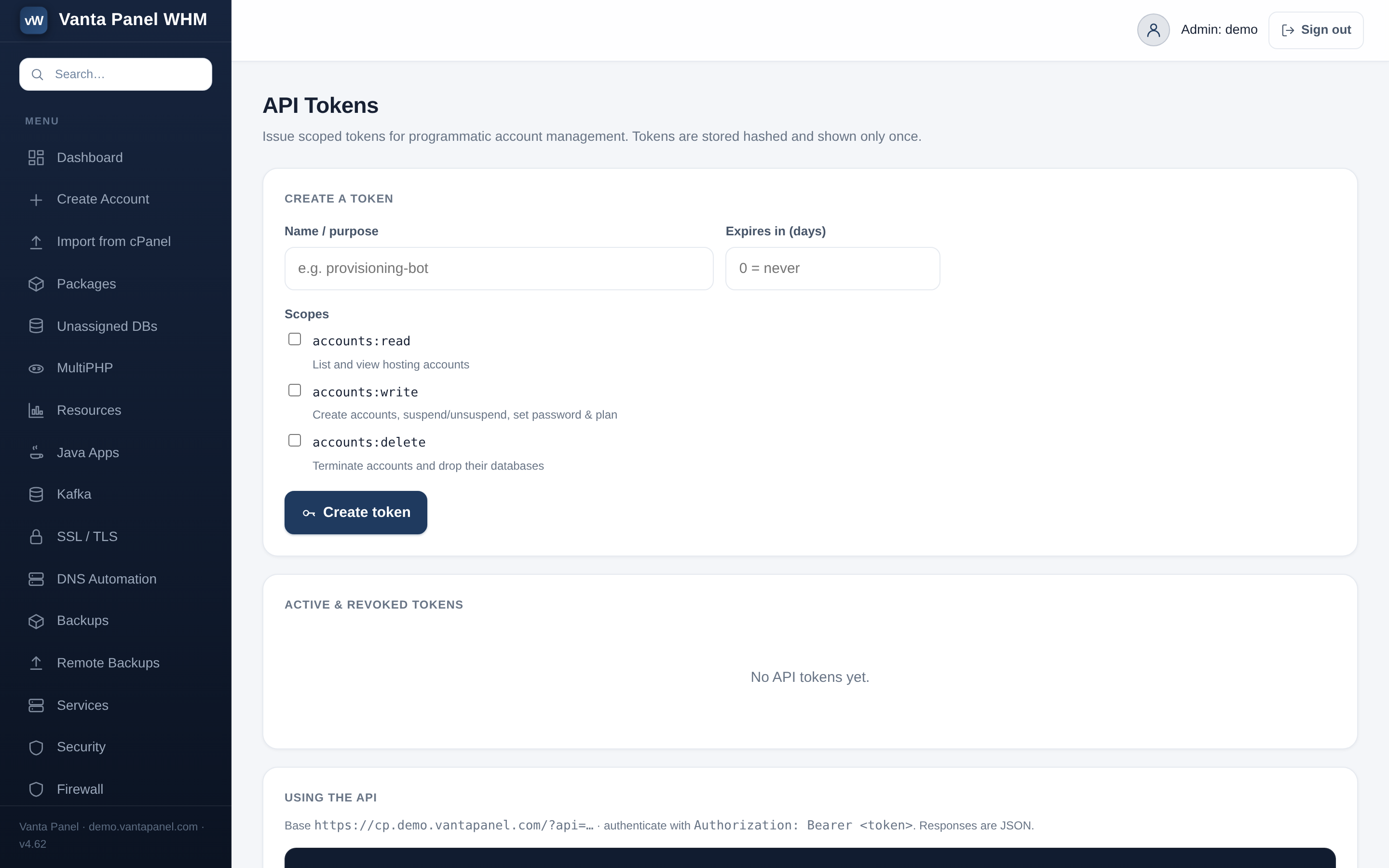
The exact screen this step asks for — and it is live in the demo if you want to click it before you install anything. -
Add the server in WHMCS
Under System Settings → Servers → Add New Server, set Hostname to your Vanta server, Server Type to Vanta Panel, paste the token as the Access Hash, tick Secure (HTTPS), then click Test Connection. That button calls
GET /api/pingand tells you immediately whether the hostname, certificate and token are all right. -
Point a product at it
Create or edit a Product (type Other, module Vanta Panel), assign the server, and set the Plan name to a Vanta package. Leave API path as
/apifor Vanta 5.2 and newer. New orders now provision automatically — place a test order and watch the account appear in vWHM.
Every WHMCS action, mapped
The module calls Vanta’s REST API with your token as an
Authorization: Bearer header over HTTPS. Nothing else touches your server.
| WHMCS action | Vanta API call | When it fires |
|---|---|---|
| Create account | POST /api/accounts | New order → provisions the account (domain, username, password, plan) |
| Suspend | POST /api/account?action=suspend | Overdue invoice → account suspended automatically |
| Unsuspend | POST /api/account?action=unsuspend | Payment received → access restored |
| Terminate | DELETE /api/account | Cancellation → account and data removed |
| Change password | POST /api/account?action=password | Client resets the panel password from WHMCS |
| Change package | POST /api/account?action=plan | Upgrade / downgrade → new plan limits applied |
| Test connection | GET /api/ping | One click in WHMCS verifies the server + token |
Idempotent by design: “already exists” on create and “404” on terminate are treated as success, so WHMCS retries are safe and can neither double-provision nor fail a cancellation twice. WHMCS usernames are sanitised to Vanta’s rules (lowercase, letter first) and written back to the service record, so the two systems cannot drift apart. Full API reference in the API documentation.
What you need
Four things, and you probably have three of them already.
- A Vanta Panel serverVersion 5.2 or newer, reachable over HTTPS. The free tier works for testing the integration end to end.
- A WHMCS installationAny current WHMCS. The module is a standard server module and installs by copying one folder.
- PHP cURL on the WHMCS hostThe module talks HTTPS with cURL. It is enabled on virtually every WHMCS host already.
- A valid certificateUse the hostname the certificate is issued for so the API call is not rejected. Vanta issues its own free certificate at install.
No Vanta server yet? One command on a fresh Ubuntu or Debian VPS puts one up, and the free tier is the identical build — enough to wire WHMCS to it and place a real test order before you pay anything.
$ curl -fsSL https://get.vantapanel.com | sudo bashWhat hosts ask before they switch
Is the WHMCS module really free?
Can I use Vanta Panel as a cPanel alternative with WHMCS?
What happens to my existing cPanel accounts?
What happens if WHMCS retries an action?
How much of my server does the token expose?
Do I need one licence per WHMCS install or per server?
Something not answered here? Ask us before you install — or read the hosting-company overview.
Download it and wire up a test order
The module is free, the panel has a free tier, and the demo needs no signup. You can prove the whole pipeline works before you spend a cent.
Direct download from get.vantapanel.com · vantapanel-whmcs.zip