 Vanta Panel
DNS Zone Editor
Add, edit and delete live DNS records for your domains from vPanel. Supported record types, Cloudflare proxying, zone import and export, and one-click email DNS setup.
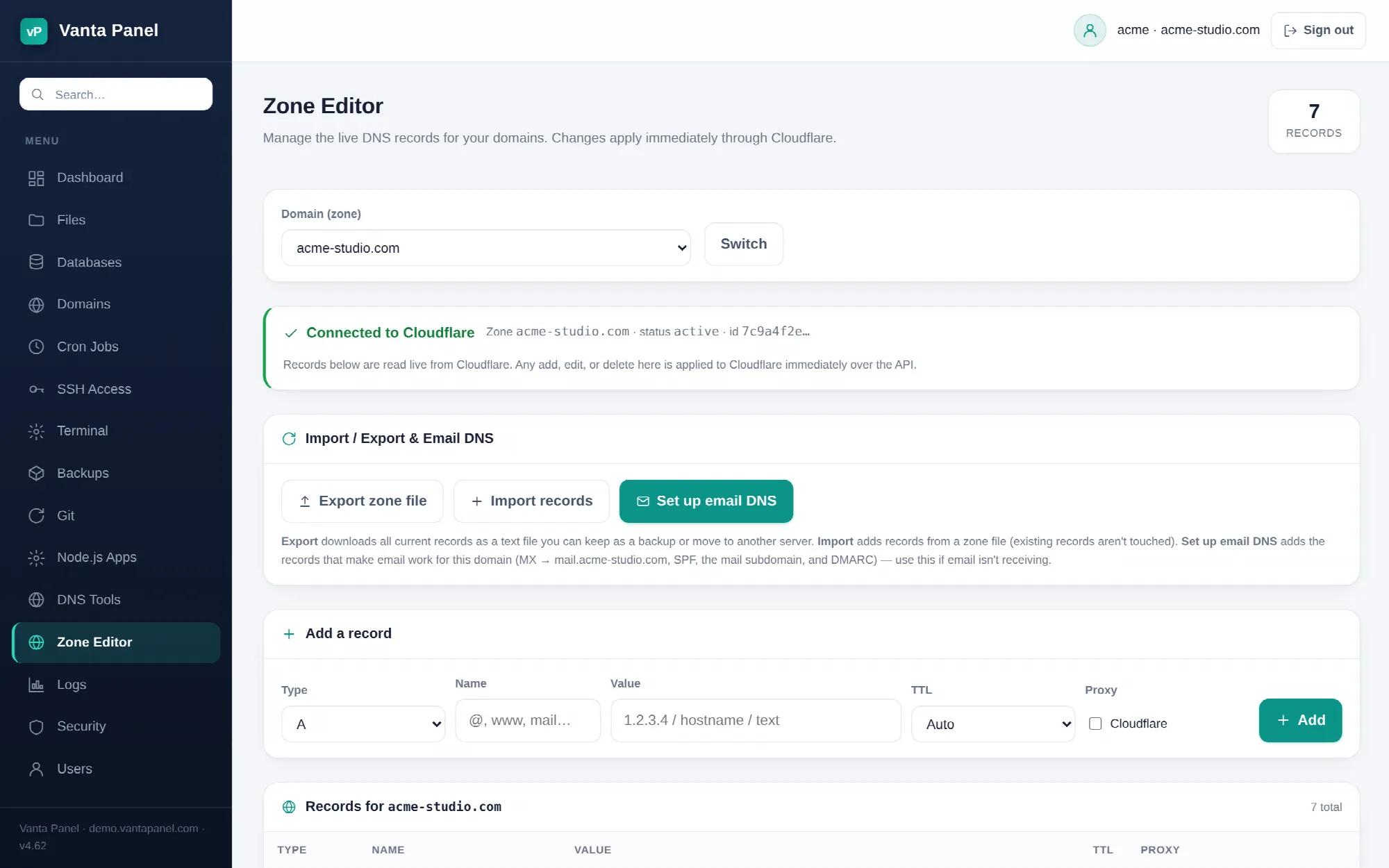 Editing live DNS records in the vPanel Zone Editor.
Zone Editor (vPanel → Zone Editor) adds, edits and deletes the DNS records for your domains. Records are read from and written to Cloudflare over its API, so every change is live the moment you save it — there is no zone file to reload and no propagation delay on the server side.
Choosing a zone
The dropdown at the top lists the domains you can edit: your account's main domain and any addon domains. Subdomains are not listed separately — a subdomain is a record inside its parent zone, so edit it there.
Switching the dropdown reloads the record list for that domain.
Requirements
The Zone Editor only works when the domain's zone is on the Cloudflare account this server is configured with, and the server has a Cloudflare API token with Zone › DNS › Edit permission. The server administrator sets that token in vWHM → SSL / TLS or vWHM → DNS Automation.
When both are in place the page shows a green Connected to Cloudflare bar with the zone name, its Cloudflare status and the first characters of its zone ID. When they are not, you get a red Not connected to Cloudflare panel with the underlying error, and records can neither be read nor changed. Nothing is silently half-applied.
Adding a record
The add row takes a type, a name, a value, and a TTL:
- Type —
A,AAAA,CNAME,MX,TXTorNS. These are the six types the editor manages; other record types on the zone are not shown and are left alone. - Name —
@for the domain itself, or a label such aswwwormail. A bare label is treated as relative to the zone, sowwwbecomeswww.example.com. A name outside the zone is rejected. - Value — validated per type. An
Arecord must be a valid IPv4 address,AAAAa valid IPv6 address, andCNAME,NSandMXa hostname.TXTvalues are capped at 2048 characters. - Priority — appears only for
MX, and defaults to 10. - TTL — Auto, 5 minutes, 1 hour or 1 day.
- Proxy — appears only for
A,AAAAandCNAME. Ticking it turns on Cloudflare's proxy (the orange cloud).
Leave Proxy off until the domain's SSL certificate has been issued. Proxying an unencrypted origin is what produces the redirect loops and 5xx errors described in Troubleshooting.
Editing and deleting
Edit opens the record in a dialog. Everything is editable except the type — to change a record's type, delete it and add a new one. Delete asks for confirmation and removes the record from Cloudflare immediately.
Export
Export zone file downloads every record the editor can see as a plain text file named dns-<domain>-<date>.zone, one record per line:
NAME                           TTL    TYPE   [PRIO] CONTENT
example.com                    auto   A             203.0.113.10
www                            auto   CNAME         example.com
example.com                    auto   MX     10     mail.example.com
example.com                    auto   TXT           "v=spf1 a mx ~all"
TXT values are quoted so spaces survive, and proxied records are marked with a trailing ; proxied comment. Keep the file as a backup before a large change, or as the input for moving the zone to another server.
Import
Import records accepts the same format, either pasted into the box or uploaded as a .zone or .txt file up to 256 KB. Lines beginning with ; or # are treated as comments.
Import adds records; it never replaces or deletes. A record that already matches is reported as already existing and skipped, so re-running an import is safe. Lines that cannot be parsed, or that use a type outside A, AAAA, CNAME, MX, TXT, NS, SRV and CAA, are counted as skipped. The result message tells you how many were added, how many already existed and how many lines were skipped.
Set up email DNS
Set up email DNS is a one-click fix for a domain whose mail is not arriving. It adds, in one pass:
- An
Arecord formail.<domain>pointing at the server's public IP - An
MXrecord for the domain pointing atmail.<domain>with priority 10 - An SPF
TXTrecord —v=spf1 a mx ~all, or withinclude:spf.brevo.comadded when the server relays through Brevo - A DKIM signing key, generated on the server if it does not exist, published as
vanta._domainkey - A DMARC
TXTrecord at_dmarcwithp=noneand aruaaddress atpostmaster@<domain>
Existing matching records are left untouched, so it is safe to run on a domain that is already partly configured. Allow a minute or two, then send a test message. See Email for the wider deliverability picture.
Related
- DNS Tools — look up what the public internet currently sees
- DNS Automation — how the administrator has these records created automatically for new accounts
- Private Nameservers — running authoritative DNS on the server instead of Cloudflare