
Packages and Plans
Define reusable packages of per-account limits in vWHM. What each limit actually enforces, what happens when an account hits one, and how packages interact with your license.
On this page 7 sections
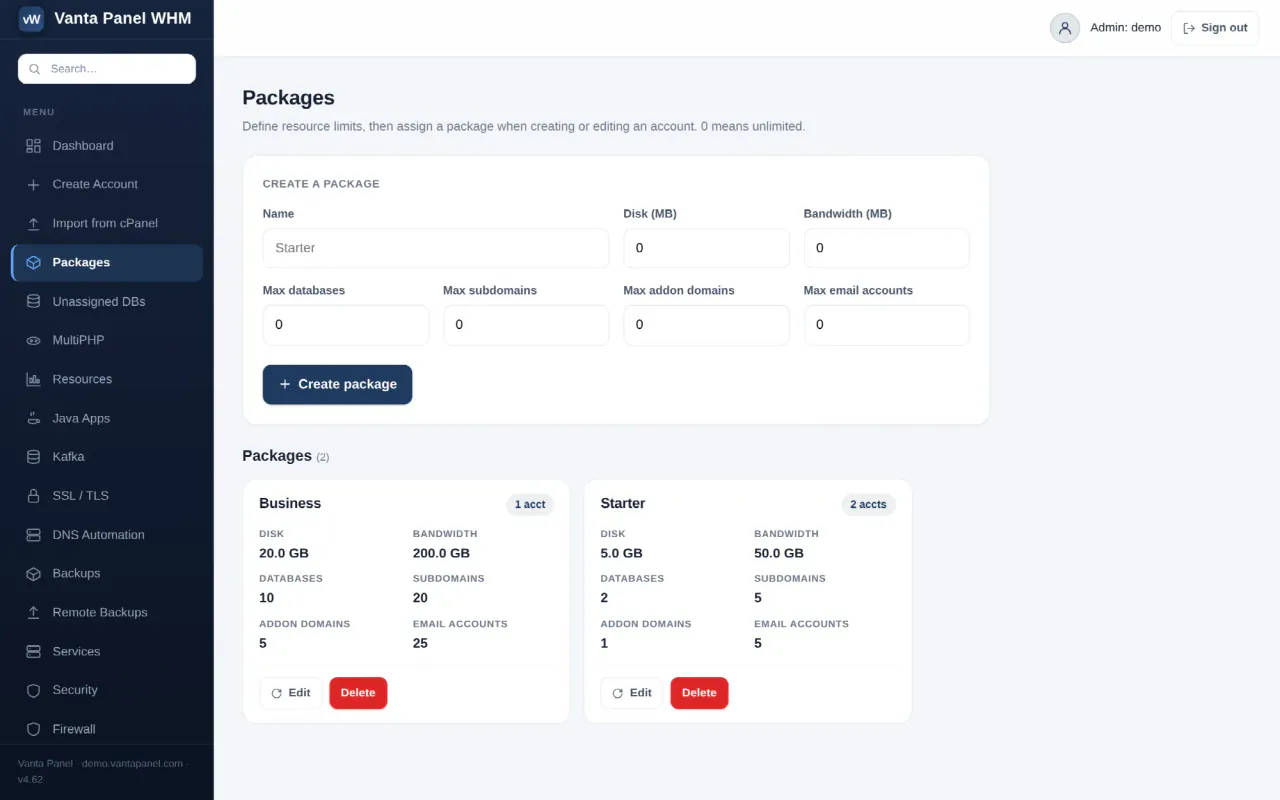
Packages (vWHM → Packages) are reusable sets of limits you assign to hosting accounts. They are how you sell tiers: define "Starter", "Business" and "Pro" once, then assign a package instead of configuring each account by hand.
A package is nothing more than a named row of six numbers. Assigning it to an account tells the panel what that account's ceilings are.
Creating a package
The form at the top of the page creates a package; clicking Edit on an existing card loads it back into the same form. Package names allow letters, numbers, spaces, _ and -, up to 64 characters, and must be unique — a duplicate name is rejected.
In every numeric field, 0 means unlimited. That is the default for a new package, so an all-zero package is a package with no restrictions at all.
What each limit does
| Field | Effect |
|---|---|
| Disk (MB) | The figure the account's measured disk usage is compared against — the denominator of the disk bar in vPanel and in vWHM → Resources. |
| Bandwidth (MB) | Stored and displayed on the package card. |
| Max databases | Blocks creating, adopting or restoring a database once the count is reached. |
| Max subdomains | Blocks adding a subdomain once the count is reached. |
| Max addon domains | Blocks adding an addon domain once the count is reached. |
| Max email accounts | Shown as a usage figure on the customer's dashboard and raises a warning at the limit. |
Three of these need to be read literally, because they are reporting figures rather than hard blocks:
- Disk is not a filesystem quota. Nothing stops the account writing past it. What it does is drive the percentage bars and the warning shown on the customer's dashboard, and mark the account "over quota" in vWHM → Resources — so you can see who to contact.
- Bandwidth is recorded on the package and shown on its card. It is not metered or enforced anywhere in the panel.
- Max email accounts drives the usage figure and the warning row on the customer's dashboard, and the mailbox entry in Needs attention on the vWHM dashboard. Mailbox creation itself is gated by the license limit, not by this number, so a customer on a paid license can pass the package's mailbox figure.
Databases, subdomains and addon domains are real blocks, checked server-side before the resource is created. If you need a hard mailbox ceiling, watch the dashboard for accounts that have reached the figure rather than relying on the panel to refuse.
What the customer sees when a limit is hit
For the limits that block, enforcement happens in vPanel at the moment the customer tries to create something. They get a plain error naming the limit — for example "Database limit reached (5 for your plan)" — and nothing is created. There is no queue and no partial success.
Before that point they see the limits as they go: the vPanel dashboard shows disk, mailboxes, databases and subdomains as used of limit with a coloured bar, and raises a warning row when a count reaches its ceiling.
You see the same thing from the other side. The Needs attention panel on the vWHM dashboard lists every account that has reached its database, mailbox or subdomain limit, and vWHM → Resources flags accounts over their disk quota or over their database count.
Assigning and changing a package
Assign a package in the Package dropdown when creating an account, or change it later under Plan & usage on the account's management screen. Both accept none (unlimited), which is what an account has if you never assign one.
Changing a package takes effect on the next action the account attempts. Nothing is migrated, deleted or reduced. An account that is already over a newly-lowered limit keeps everything it has — it simply cannot create more until it is under the ceiling again or you raise it.
Deleting a package
Deleting a package removes the row only. Accounts that were on it keep every resource they have, but lose the named plan: the panel then finds no package by that name and falls back to all-unlimited. The confirmation dialog warns that accounts keep their settings but lose the named plan. If you meant to tighten a tier, edit it instead of deleting it — every account on that package picks up the new numbers immediately.
The package card shows how many accounts are currently on it, so you can see the blast radius before you edit or delete.
How packages interact with the license
Packages and the license are two separate ceilings, and both apply. The license limit is checked first.
On the free tier the server is capped at 1 hosting account, 1 mailbox and 1 database in total. A package that allows 20 databases does not raise that — the account still stops at one, with an upgrade message rather than a plan-limit message. With a paid license those totals are unlimited, and your packages become the only limits that matter.
Pricing is per server, not per account: the free tier is 1 account / 1 mailbox / 1 database, and a paid license is a flat monthly fee per server for unlimited accounts, mailboxes and databases. So packages are purely your commercial tool — divide the server however you like without changing what you pay. See Activating your license.
Audit trail
Creating, editing and deleting packages are recorded in the audit log as package.create, package.update and package.delete, with the package name as the target. Assigning a package to an account is recorded separately as account.plan.
Something missing or out of date? Ask support, or try it yourself on the live demo.