
Activating Your License
Activate a Vanta Panel license key in vWHM to lift the free-tier caps. License statuses, the 12-hour re-check, the 7-day offline grace period, and exactly what happens if a license lapses.
On this page 8 sections
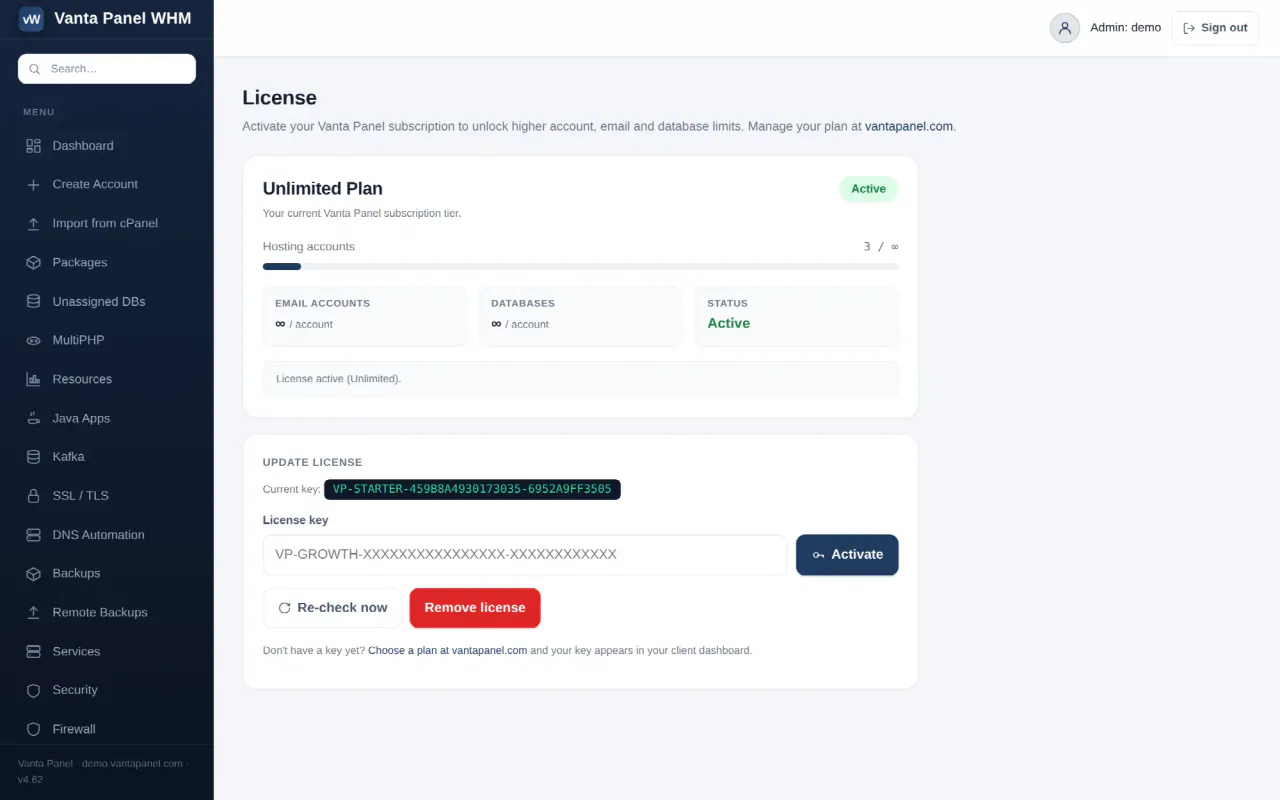
License (vWHM → License) is where you activate your Vanta Panel subscription. Without a key the panel runs in the free tier; with one, the limits are lifted.
What the free tier allows
An unlicensed install is capped at 1 hosting account, 1 email account and 1 database. Everything else works — the panel is not time-limited and nothing expires.
A paid licence comes in two sizes, both priced per server. Basic at $5 per server per month raises each cap to five: 5 accounts, 5 mailboxes, 5 databases. Unlimited at $10 per server per month lifts all three caps to unlimited: unlimited accounts, unlimited mailboxes, unlimited databases. Pricing is per server, never per account. Get a key at vantapanel.com/pricing.
Activating
- Open vWHM → License.
- Paste your key into License key and click Activate.
The panel contacts the licensing server, and the page reloads showing your plan, your limits and a status badge. Your key appears in your client dashboard at vantapanel.com after purchase.
Once active, the page shows a usage bar for hosting accounts against your limit, plus the per-account email and database limits, with ∞ meaning unlimited.
The four statuses
| Status | Meaning |
|---|---|
| Active | The key was validated and the signature checked. Paid limits apply. |
| Grace period | The licensing server could not be reached, so the last verified result is being reused. Paid limits still apply. |
| Free tier | No key, or nothing could be validated. Free limits apply. |
| Invalid | The licensing server explicitly rejected the key — expired, suspended, revoked, or in use on another machine. Free limits apply and the lapse ladder below begins. |
How validation works
Your server re-validates the key at most once every 12 hours, and caches the result in /etc/vantapanel/license.cache. While that cache is fresh, page loads read it and make no network call at all. The first page load after it goes stale is what triggers the next check.
Each request sends the key, the server's public IP, its hostname and a machine fingerprint derived from stable identifiers on the box. The licensing server's reply is signed with an Ed25519 key, and the panel verifies that signature against a public key compiled into it before accepting any result. A fake licensing server, a hand-edited cache file, or a stripped-down PHP build with the crypto extension removed all fail closed — they cannot grant paid limits.
Because the verdict is bound to the fingerprint, a key activated on one server will not validate on a clone of it. Moving to new hardware is fine — activate there and the old install falls back to free.
If the licensing server is unreachable, the last verified result keeps working for 7 days of grace. The page tells you how many days of grace remain. After that the install drops to free limits until it can check in again. A network outage on our side never locks you out of your own server.
Re-check and remove
- Re-check now forces an immediate validation instead of waiting for the 12-hour window. Use it right after renewing, or after moving the server, to clear a stale verdict at once.
- Remove license deletes the key and reverts to the free tier. Existing accounts above the free limit are not deleted; you simply cannot create more.
What happens if a license lapses
A license "lapses" only when a key is present and the licensing server actively rejects it. A genuine free install with no key never lapses, and neither does an install riding out the grace period.
Enforcement escalates by days since the first rejection:
| From | What changes |
|---|---|
| Day 0 | A red banner appears in vWHM. Creating new accounts, mailboxes and databases beyond the free limits is blocked, because the install has dropped to free-tier limits. |
| Day 3 | Backups pause — scheduled, remote and on-demand. Restoring an existing backup still works. The Backups page in each customer's panel explains why. |
| Day 7 | Customer vPanels show a notice that the server's management license is inactive. |
| Day 14 | vWHM locks to a renew screen. Only the License page stays reachable. |
Throughout all four stages, hosted websites, email and DNS stay online and untouched. The lock is on server management, not on the sites your server is serving.
Renewing and re-checking clears the state immediately and resumes everything, including backups.
The API enforces the same rules: POST requests that create accounts return 403 license_inactive at day 14, and 403 license_limit_reached when a plan limit is hit. See Using the API.
Administrative commands
A few things are done from the server's command line rather than the panel:
# Reset the Vanta admin password
sudo -u paneluser php /opt/vantapanel/bin/vantapanel-admin.php admin 'NewPassword'

# Turn 2FA off for an admin, or for a hosting account
sudo -u paneluser php /opt/vantapanel/bin/vantapanel-admin.php --disable-2fa admin
sudo -u paneluser php /opt/vantapanel/bin/vantapanel-admin.php --disable-2fa-account acme

# Check service status
systemctl status vantapanel-whm vantapanel-user
Related
- Updating Vanta Panel — keeping the install current
- Troubleshooting — when the panel will not load or a check fails
Something missing or out of date? Ask support, or try it yourself on the live demo.